
Everyone in your community has a powerful response tool right in their pocket. With smartphones, citizens can report incidents, ask for help, and share real-time information. The challenge for response organizations is harnessing this data effectively. How do you filter the noise, verify reports, and coordinate action without getting overwhelmed? A dedicated platform is the answer. While the hunt for ’emergency management software free’ is a practical starting point for many, the real goal is to find a system that empowers everyone. We’ll explore how the right technology can connect citizens and responders, creating a smarter, faster, and more collaborative community safety net.
Is Free Incident Management Software a Good Idea?
Free incident management software sounds like a good idea but is it truly? For decades now, organizations have used Excel and Sheets to provide incident management. Cloud services are improving.
This is exposing issues in managing disasters with spreadsheets. As a result, there is a push for developing cloud-based solutions. When searching for free emergency management software, it’s crucial to understand why this is usually not a good choice.
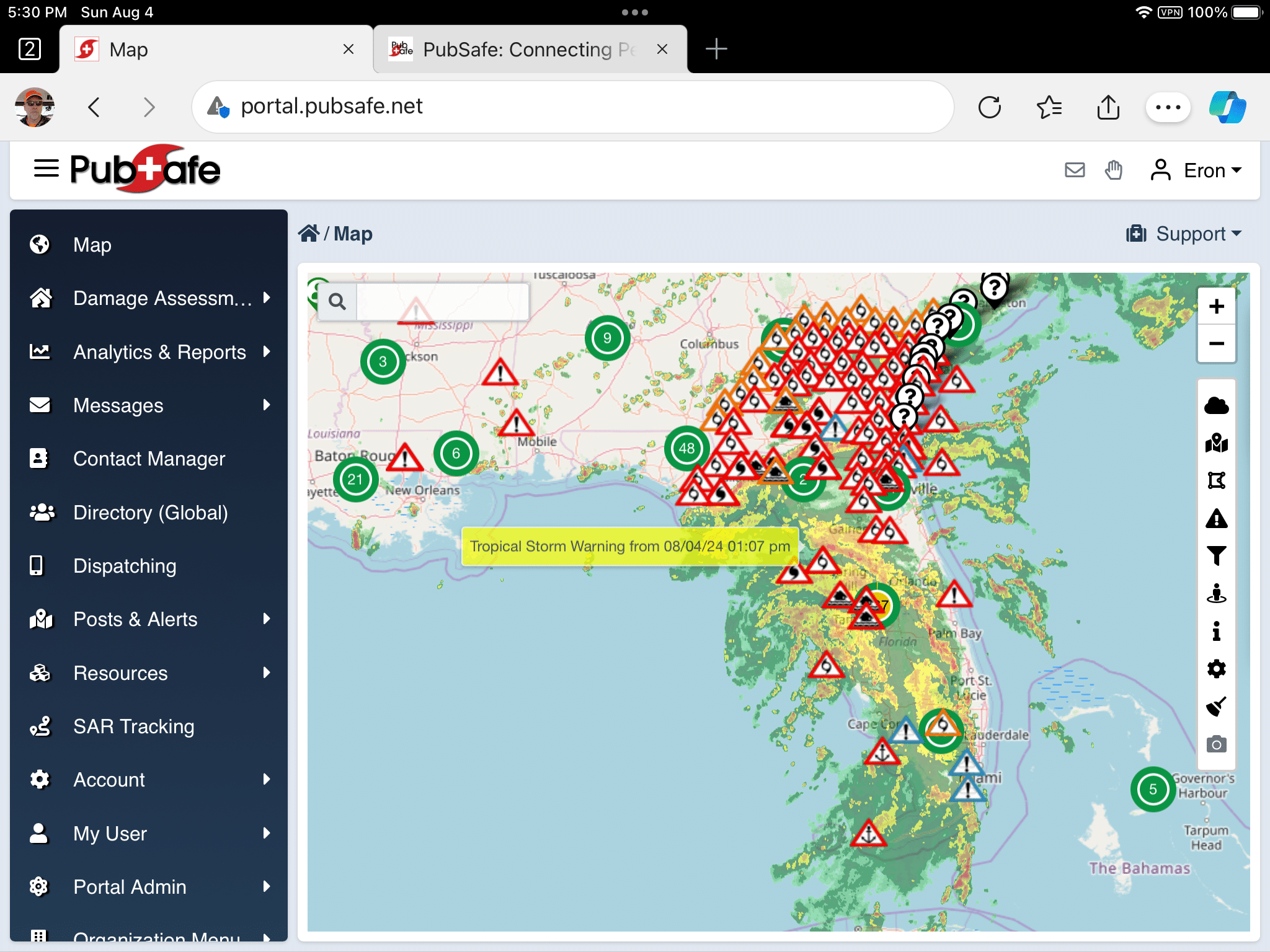
PubSafe is affordable software for managing incidents. PubSafe is inexpensive cloud based software designed to help NGOs, FBOs, and CERTs manage incidents. It facilitates information sharing and collaboration during emergencies and everyday operations. It makes responders more efficient within an organization and enables information sharing between organizations.

Creating incident management software like PubSafe requires a lot of money and time. It costs hundreds of thousands of dollars to develop and make it available globally. A free platform is never likely to be as robust as a paid web application which is why there is a nominal fee for access the web portal.
Developers will not update or maintain free software with regularity or consistency. An app developer needs a financial reward to work hard, be creative, and give up other opportunities. This is large why America is successful as a capitalist country.
What is Emergency Management Software?
At its core, emergency management software is a digital toolkit designed to help communities and organizations handle crises more effectively. Think of it as a central command center that operates on your computer or phone. Instead of relying on scattered spreadsheets, frantic phone calls, and paper maps, this software brings all the critical information and communication into one organized space. This allows everyone involved—from first responders to community volunteers—to see the same picture of what’s happening in real-time. The main goal is to streamline coordination, reduce confusion, and ultimately help people make smarter, faster decisions when every second counts, whether during a natural disaster or a large public event.
Defining Incident Management Software (IMS)
Incident Management Software, or IMS, is a specific type of emergency management software focused on the nitty-gritty details of an ongoing event. According to the Department of Homeland Security, it’s a suite of tools that collects and manages crucial incident data in a collaborative environment. In simpler terms, it’s the software that helps leaders and teams on the ground manage an incident from start to finish. It logs events as they happen, tracks resources like personnel and equipment, and provides a clear, chronological record of the response effort. This ensures that everyone is working with the most current information, which is vital for a coordinated and effective response.
A Central Hub for Critical Data
The true power of an IMS is its ability to act as a single source of truth. It gathers many different kinds of information—like damage reports from citizens, the location of response teams, and shelter capacities—and presents it in an accessible way. This creates a common operating picture, a shared understanding of the situation for everyone involved. Instead of teams operating in silos with incomplete data, they can all access the same map and the same updates. The primary purpose of this centralization is to support clear and confident decision-making during chaotic and high-stress situations, ensuring that resources are sent where they are needed most.
For Planned Events and Unexpected Emergencies
While we often associate this software with sudden disasters like floods or wildfires, its utility extends far beyond that. Incident management software is just as valuable for managing planned events. Think about large-scale happenings like marathons, music festivals, or major public gatherings. These events require a massive coordination effort to manage security, medical services, and crowd flow. An IMS helps organizers plan for potential issues, monitor the event in real-time, and respond quickly if something goes wrong. This versatility makes it an essential tool for ensuring public safety, no matter if the event is a planned celebration or an unexpected crisis.
The Four Phases of Emergency Management
Effective emergency management isn’t just about what happens during a disaster; it’s a continuous cycle with four distinct phases. These phases provide a framework for officials and organizations to build resilient communities. They are often referred to as prevention (or mitigation), preparedness, response, and recovery. Each phase presents unique challenges and requires different strategies and tools. A comprehensive software platform can support activities across this entire lifecycle, moving beyond just real-time response to help communities reduce risks beforehand and rebuild more effectively afterward. This holistic approach is key to minimizing the impact of future emergencies.
Prevention, Preparation, Response, and Recovery
Modern software supports all four phases of emergency management. During prevention, it can help identify at-risk areas. In the preparedness phase, it’s invaluable for tasks like registering volunteers and mapping out resources before a disaster strikes. When an incident occurs, the software shines in the response phase by tracking teams, managing tasks, and sharing real-time information. Finally, during the long-term recovery phase, it provides the data needed for damage assessments and helps coordinate rebuilding efforts. By supporting each stage, these platforms ensure a more seamless and effective approach to community safety and resilience.
The Critical Pre-Arrival Phase
The moments just after an emergency begins but before professional first responders arrive are often the most chaotic and critical. This is known as the pre-arrival phase. During this time, the people already on the scene—everyday citizens and bystanders—are the true first responders. Their actions can have a massive impact on the outcome. Modern emergency management technology recognizes this and is increasingly designed to empower these individuals. By providing them with reliable information and a way to communicate what they are seeing, software can bridge the gap and help create a more effective, community-wide response from the very beginning.
Empowering Bystanders Before First Responders Arrive
Mobile apps are a game-changer in the pre-arrival phase. They can turn a bystander’s smartphone into a powerful tool for public safety. For instance, an app can provide simple instructions for basic first aid or show the location of nearby defibrillators. It also allows people to report an incident directly from their phone, complete with photos and a precise location, giving official responders better situational awareness before they even arrive. Platforms like PubSafe are built on this principle, providing a free app that connects citizens with response organizations, empowering them to be an active part of the solution during those crucial first minutes.
Understanding Emergency Management Frameworks
To ensure that everyone can work together during a large-scale emergency, standardized frameworks were developed to guide response efforts. These frameworks act as a common playbook, outlining shared terminology, procedures, and structures so that different teams and agencies can coordinate without confusion. The two most important frameworks in the United States are the National Incident Management System (NIMS) and the Incident Command System (ICS). Most modern emergency management software is designed to align with these systems, making it easier for organizations to follow established protocols and collaborate effectively when responding to an incident.
NIMS vs. ICS: What’s the Difference?
It’s easy to get NIMS and ICS confused, but the distinction is pretty straightforward. Think of NIMS as the overall strategy and ICS as the specific tactic used on the ground. NIMS is the broad, national-level doctrine that provides a consistent framework for emergency management and response across the country. ICS, on the other hand, is a component of NIMS. It’s the standardized, on-scene management structure used to organize and coordinate the response to a specific incident. In short, NIMS is the big-picture approach, while ICS is the command-and-control tool you use at the scene of the emergency.
The National Incident Management System (NIMS)
The National Incident Management System, or NIMS, was developed to ensure that responders from different jurisdictions and disciplines can work together seamlessly. It provides a comprehensive template for managing incidents, regardless of their size, scope, or complexity. As outlined by FEMA, NIMS is not a response plan itself; rather, it’s a set of guiding principles and concepts that organizations can adopt. This shared doctrine covers everything from resource management to communications, ensuring that a fire department from one state can effectively collaborate with a public health agency from another during a joint operation.
The Incident Command System (ICS)
The Incident Command System (ICS) is the organizational structure used to manage the on-scene response. It establishes a clear chain of command and a manageable span of control, so everyone knows who is in charge and what their role is. ICS is organized around five major functions: Command, Operations, Planning, Logistics, and Finance/Administration. This standardized structure is flexible and can scale up or down depending on the size of the incident. Whether it’s a small house fire or a massive hurricane response, ICS provides a predictable and efficient management framework for responders on the ground.
Key Capabilities of Modern Response Platforms
Today’s response platforms are far more than just digital maps. They are comprehensive systems packed with features designed to support every aspect of an emergency response. These capabilities are generally tailored to two main groups: the professional organizations and teams managing the incident, and the public who are directly affected by it. For organizations, the software offers tools for managing personnel, tracking resources, and coordinating complex operations. For the public, it provides a vital connection to official information and a way to both receive and offer help, fostering a sense of community resilience and active participation in safety efforts.
Features for Organizations and Response Teams
For NGOs, CERT teams, and public safety agencies, modern software offers a suite of tools to make their jobs easier and more effective. These platforms are designed to handle the complex logistics of a disaster response. They help managers get the right people and the right equipment to the right place at the right time. By automating administrative tasks and providing a clear overview of the entire operation, this software frees up team leaders to focus on strategic decision-making. This leads to a more efficient, organized, and impactful response, maximizing the effectiveness of every volunteer and resource deployed.
Volunteer and Skills Management
During a disaster, volunteers are an incredible asset, but managing them can be a huge challenge. Modern platforms simplify this with robust team management features. Organizations can create a database of their members, tracking their contact information, certifications, and special skills—like a medical background or chainsaw operation. When an incident occurs, managers can quickly see who is available and identify the best people for a specific task. This ensures that volunteers are used effectively and safely, matching their skills to the needs on the ground.
Resource and Equipment Tracking
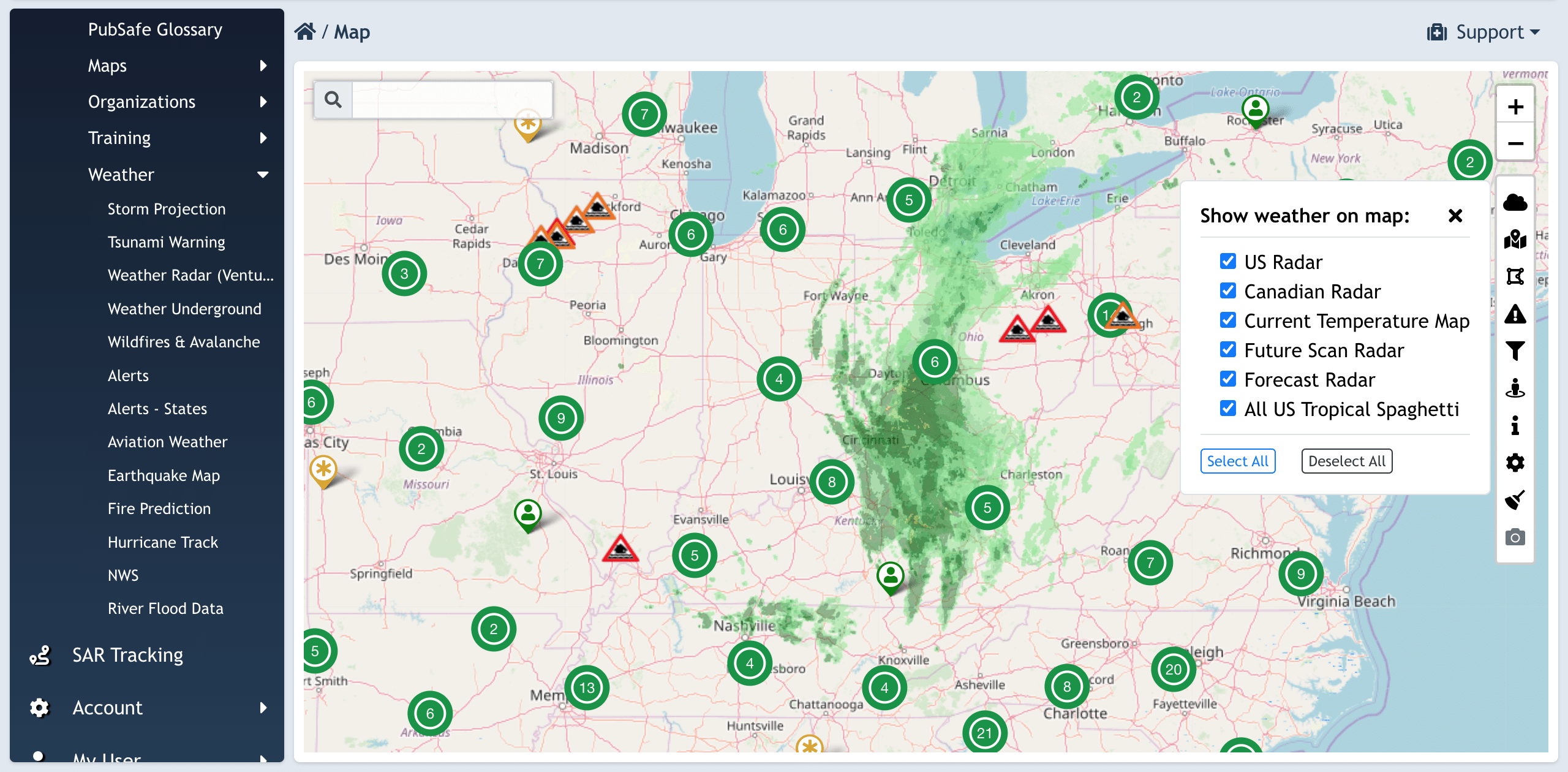
Knowing what resources you have and where they are is critical. Response platforms allow organizations to maintain a detailed inventory of their assets, from vehicles and generators to medical supplies and communication equipment. During an incident, these resources can be tracked in real-time on a map, showing what is available and what is currently deployed. This capability prevents resources from being lost or underutilized and helps planners make informed decisions about resource allocation, ensuring that critical equipment gets to where it’s needed most without delay.
Mission Creation and Management
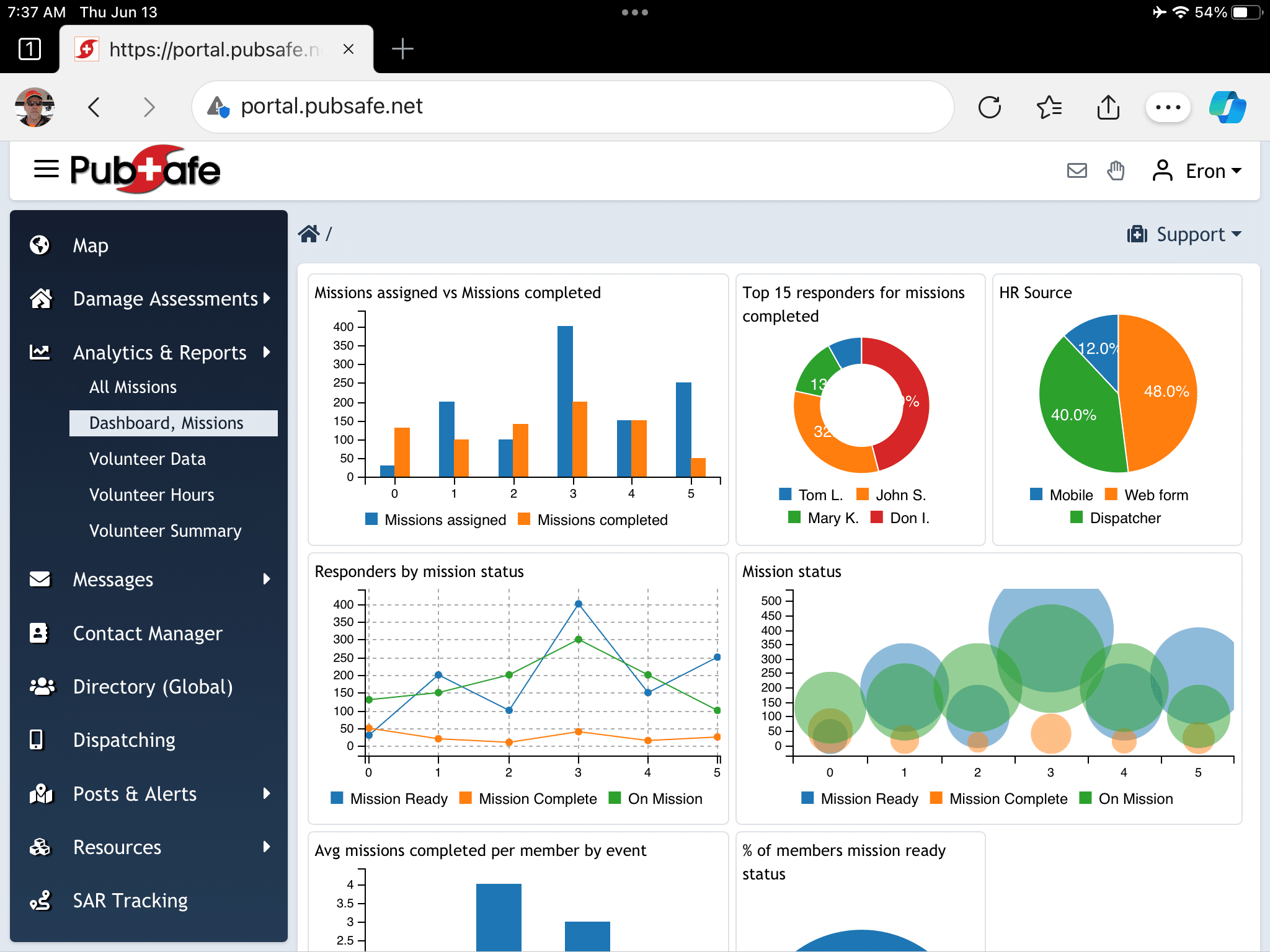
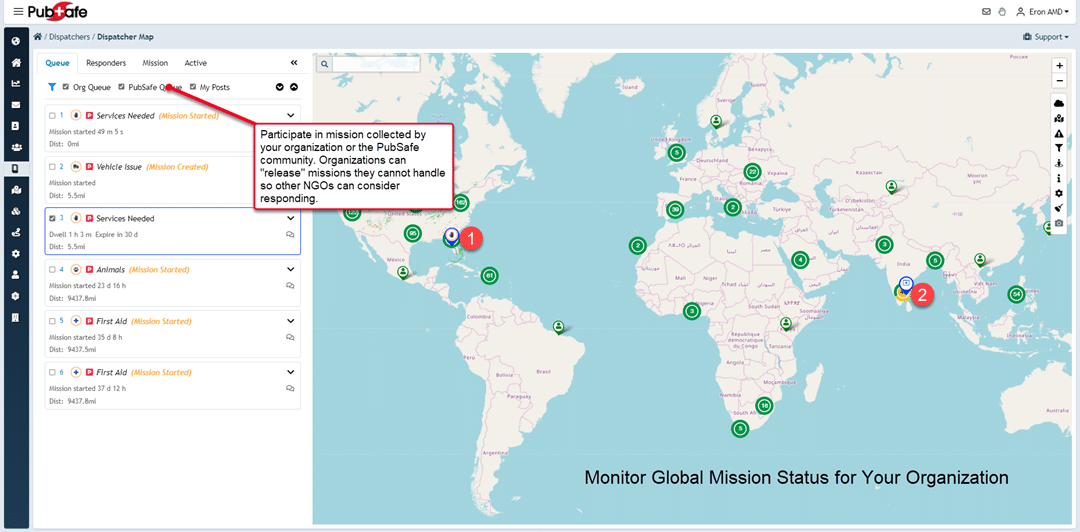
A successful response is built on clear, well-defined missions. Software platforms allow command staff to create, assign, and track tasks for their teams. A mission could be anything from conducting a damage assessment in a specific neighborhood to delivering supplies to a shelter. Team members can receive their assignments directly on their phones, view all the relevant details, and update their status as they complete the task. This creates a closed-loop system where managers have full visibility into the progress of all ongoing operations.
Inter-Agency Information Sharing
Disasters rarely affect just one jurisdiction or organization. Effective response requires collaboration between multiple agencies, from local fire departments and NGOs to state and federal partners. Modern platforms are designed to break down communication silos by allowing different organizations to share information securely. For example, one NGO can share its incident map with another, creating a unified view of the operational area. This level of interoperability is crucial for deconflicting efforts and ensuring that all responding agencies are working together toward a common goal.
Automated Reporting and Hour Tracking
After the immediate crisis has passed, the paperwork begins. Documenting response activities is essential for after-action reviews and, for many organizations, for securing reimbursement from agencies like FEMA. Incident management software automates much of this process. It automatically logs all activities, communications, and volunteer hours. This creates a detailed, time-stamped record of the entire response, making it easy to generate accurate reports. This saves countless administrative hours and provides valuable data for improving future operations.
Features for the Public
Modern emergency management isn’t just a one-way street where officials push out information. It’s about creating a partnership with the community. The best platforms include features specifically designed for the public, transforming citizens from passive recipients of aid into active participants in their own safety. These tools provide direct access to trusted information, empower people to report what’s happening around them, and create a network for neighbors to help neighbors. This fosters a stronger, more resilient community that can respond more effectively from the ground up.
Real-Time Safety Alerts from Official Sources
During an emergency, timely and accurate information is your most valuable asset. Modern platforms allow official sources, like your local emergency management agency or sheriff’s office, to send out real-time safety alerts. These aren’t just generic messages; they can be targeted to specific geographic areas. This ensures you receive warnings and instructions that are relevant to your exact location, such as an evacuation order for your neighborhood or information about a nearby road closure, directly on your phone.
Community Incident Reporting
Nobody has a better view of what’s happening in a neighborhood than the people who live there. Many platforms now include a feature for community incident reporting, allowing citizens to act as eyes and ears for first responders. Using a mobile app, you can report issues like a downed power line, a flooded street, or a fallen tree. These reports, often including photos and GPS coordinates, appear on the map for both the public and official responders to see, providing invaluable, real-time situational awareness.
Requesting and Offering Help
Disasters often bring out the best in people, with many looking for ways to help their neighbors. Modern platforms facilitate this by creating a digital space where people can both request and offer assistance. Someone who needs help—perhaps an elderly resident who can’t evacuate on their own—can post a request. At the same time, a volunteer with a truck can see that request and offer to help. This creates a powerful, community-driven support network that complements the official response effort.
Personal Safety Tools
Beyond community-level features, these platforms often include tools for personal and family safety. A common feature is a “check-in” or “I’m safe” button that allows you to quickly notify family and friends of your status during an emergency. Some apps also include a “safe route” feature that uses real-time data to help you find the safest path to a shelter or away from a hazard, guiding you around blocked roads or dangerous areas.
Integrated Communication Methods
Getting the right message to the right people at the right time is the cornerstone of effective emergency communication. Modern response platforms use a variety of integrated methods to ensure that information flows quickly and reliably. They move beyond simple text messages or emails to more sophisticated systems that can handle mass notifications and target specific populations. This multi-channel approach ensures that critical alerts and updates can reach as many people as possible, even when some communication networks are down or overloaded.
Mass Notification Systems
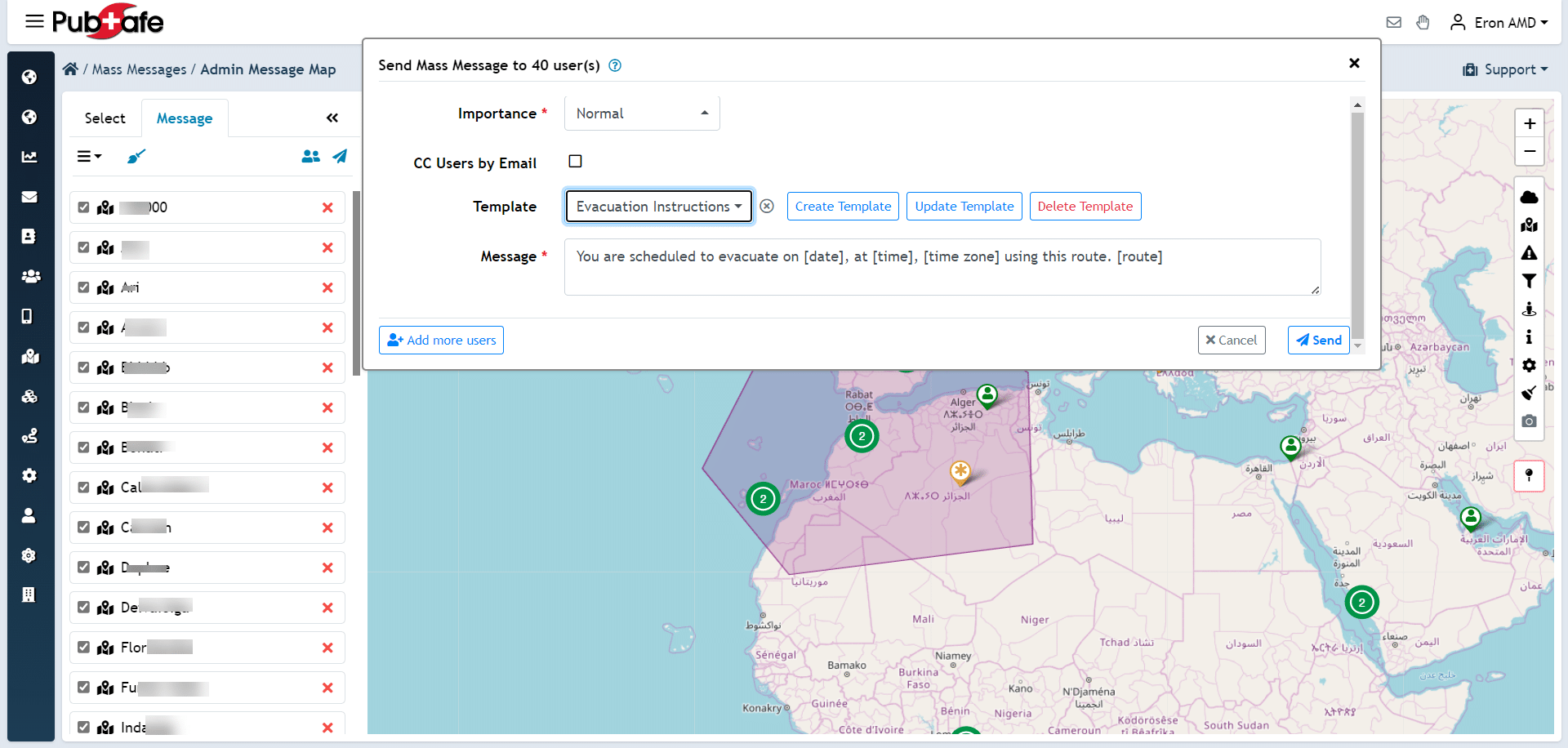
When you need to get a message out to thousands of people instantly, a mass notification system is the tool for the job. These systems can send alerts simultaneously through multiple channels, including push notifications on a mobile app, text messages, emails, and even automated phone calls. This redundancy is key in an emergency, as it increases the chances that everyone will receive the message. Organizations can use these systems to send out broad alerts, like a severe weather warning for an entire county.
Geo-Targeted Alerts
Sometimes, a message is only relevant to a very specific area. Geo-targeted alerts allow communicators to draw a shape on a map and send a notification only to devices within that boundary. This is incredibly useful for localized incidents like a hazardous material spill, a police search for a suspect, or a flash flood warning for a specific creek. By targeting the message so precisely, it reduces unnecessary alarm for those not in the affected area and ensures that people who are in danger pay close attention to the alert.
Who Uses Incident Management Software?
The user base for incident management software is incredibly diverse, spanning the entire spectrum of a community’s response ecosystem. It’s not just for professional first responders in a command post anymore. The technology is now accessible and useful for a wide range of stakeholders. This includes government agencies at the local, state, and federal levels, as well as non-governmental organizations (NGOs), faith-based groups, and Community Emergency Response Teams (CERTs). Most importantly, modern platforms are also designed for use by the general public, recognizing that citizens are a vital part of any successful emergency response.
Connecting a Wide Range of Stakeholders
The true strength of a modern IMS lies in its ability to serve as a common platform for all these different groups. It breaks down the traditional barriers that have often separated professional responders from volunteer organizations and the public. On a single platform, a fire department can coordinate with a local church group that has opened a shelter, while a CERT team uses the same map to conduct damage assessments. This shared environment fosters unprecedented levels of collaboration and ensures that everyone is operating from the same playbook, leading to a more unified and effective community-wide effort.
From Citizens to Professional First Responders
The most innovative platforms are those that successfully bridge the gap between the public and official agencies. They create a two-way street for information. Citizens can use a simple mobile app to report incidents and request help, feeding valuable, on-the-ground intelligence into the system. At the same time, professional responders can use their advanced tools to analyze that information, manage their resources, and push out official alerts to the public. This is the core idea behind how PubSafe works—it creates a seamless ecosystem where everyone, from a concerned citizen to a seasoned emergency manager, can contribute to the safety of their community.
Integration with 911 and PSAPs
A key evolution in incident management is the growing integration with 911 call centers, also known as Public Safety Answering Points (PSAPs). Historically, information reported by the public through an app would exist in a separate system from the 911 dispatch system. Now, platforms are being developed to feed data directly to dispatchers. This means that a photo of an accident reported through an app could appear on a 911 dispatcher’s screen, providing them with critical context. This integration helps streamline the flow of information, reduces the chance of duplicate reporting, and gives first responders a richer understanding of a situation before they arrive on the scene.
Why Choose Open Source for Emergency Management?
Opensource incident management software may not be reliable for security and performance. This happens because volunteers with varying skills and motivations develop it. Popular open-source apps like WordPress and OpenStreetMap have governing groups, set standards, and millions of users and developers. Extremely advanced software applications reach this level.
Web based incident management software also requires a server with cyber security, internet connection, server administration, web server, and ongoing updates. These things take time and money from professionals. Without managed hosting, hackers can easily attack the application. This can cause it to become outdated and run poorly or not run at all.
PubSafe is the most affordable / free incident management software available. With PubSafe, organizations can streamline their communication and enhance collaboration among team members.
The platform is easy to use, helping users report incidents, track progress, and manage resources efficiently. In emergencies, every second matters, and a dependable tool like PubSafe can greatly help.
What’s the Real Cost to Get Started?
PubSafe users only pay for the PubSafe mobile app when they have an active version Pro enabled. Users can downgrade to free or upgrade to Pro through their app marketplace. The free version enables citizens to contribute feedback in real-time in addition to requesting assistance.
There currently is not fee to NGOs to create or use the web portal. The members of the organization provide funding by paying for the app upgrade. This makes PubSafe a free incident management software for the organization. Volunteers spend more getting to a disaster, training or meeting than PubSafe costs for a month. The best news is that the organization does not have to constantly worry about raising money to pay for the platform.
For example, an organization can keep an account inactive for 8 months and only use it during hurricane season. Some incident management systems charge 2-5 times more annually, regardless of whether users utilize them.
Moreover, designers created PubSafe to be flexible and adaptable to various situations. Organizations can customize some of the software to fit their needs, whether for a disaster, event, or safety drill. This versatility ensures that teams are always prepared, no matter the circumstances, location or disaster.
The user-friendly interface of PubSafe makes it accessible for all team members, regardless of their technical expertise. Training new staff becomes a breeze, allowing organizations to quickly adapt and maintain their operational efficiency. The easy design promotes frequent use, helping create a culture of readiness and quick response in the organization.
PubSafe can grow and adapt as organizations expand or change their needs. PubSafe can easily adjust to changes such as opening new locations, increasing user numbers, or integrating with other systems. This flexibility allows the system to evolve seamlessly without interrupting current operations.
Finding Funding for Your Safety Programs
Even with cost-effective tools, every organization knows that budgets are a reality. Equipping your team, conducting training exercises, and supporting your volunteers all require resources. The good news is you don’t have to cover these costs alone. Many organizations overlook valuable funding opportunities that can support their public safety and emergency response initiatives. Securing grants can provide the financial stability needed to not only maintain your current operations but also to expand your capabilities, ensuring your team is prepared for any event. Thinking strategically about funding is a critical step in building a resilient and effective response program for your community.
Using Government Grants like the ARP and CARES Act
Large-scale federal programs often contain provisions that can directly or indirectly support your mission. For instance, the CARES Act was designed to provide broad financial assistance to help communities recover from crises. These funds can be used to establish local grant programs that strengthen public safety and support the organizations essential to community resilience. Similarly, the American Rescue Plan (ARP) allocated billions to support various sectors, and these funds often flow down to state and local agencies that you can partner with or apply to for support.
Exploring these avenues can help you secure the resources needed to invest in critical infrastructure, from personal protective equipment to advanced communication platforms. When your organization has a solid operational plan and the right tools to manage incidents and coordinate volunteers, it becomes a much stronger candidate for this type of funding. Look for grant opportunities offered by your city, county, or state that are backed by these federal initiatives. This funding can be the key to implementing a robust system that keeps your team and your community safe and connected during critical events.
Are You Building Your Response on a Solid Foundation?
Investing in a complete incident management solution like PubSafe helps build a strong organization foundation. A concrete foundation is more expensive than building on sand but it last much longer. A platform like PubSafe can also continue to fulfill a mission. Organizations can improve their impact by using the best tools and resources. This will help them be better prepared to assist those in need.
Moreover, a dedicated platform like PubSafe not only streamlines incident management but also fosters collaboration among team members and between organizations. Organizations can easily communicate and share information in real-time, ensuring everyone is working together effectively and staying informed. Organizations can pass work orders between one another to balance the load of work and find the right resources to solve problems. Quick communication can save lives and make a big impact.
Get your free organization account created today and see how PubSafe can help your NGO, FBO or CERT improve in disaster response and emergency response efficiency.
Frequently Asked Questions
Why should our organization pay for software when free options like spreadsheets exist? Relying on spreadsheets or unsupported free software for emergency response is like building a house on sand. While it seems practical at first, it lacks the security, reliability, and real-time features needed during a crisis. A dedicated platform is a solid foundation. It’s professionally developed, secure, and constantly updated, ensuring it works when you and your community need it most.
The post says PubSafe is free for organizations, so how does it work? This is one of the best parts. Your organization gets access to the web portal and all its management tools at no cost. The platform is supported by the individual users and volunteers who can choose to upgrade their personal mobile app for a small fee. This model removes the financial burden and constant fundraising pressure from your organization, so you can focus on your mission.
Is this type of software only useful during major disasters like a hurricane? Not at all. While it’s essential during large-scale disasters, it’s just as effective for managing planned events. Think of coordinating volunteers and medical staff at a marathon, managing security at a festival, or even running a community safety drill. It provides a central hub for communication and coordination for any event, planned or unexpected.
How does this platform actually help us manage our volunteers on the ground? It gives you a clear, real-time picture of your entire operation. You can see which volunteers are available, what skills or certifications they have, and assign them specific missions directly through the app. As they work, they can update their status, and the system automatically tracks their hours, which simplifies your reporting and after-action reviews tremendously.
Can anyone in the community use this, or is it just for official responders? It’s designed for everyone. The core idea is to connect citizens with response organizations. Anyone can download the free mobile app to report what they’re seeing, request assistance, or receive official safety alerts. This turns community members into active partners, providing responders with valuable on-the-ground information from the very start of an incident.
Key Takeaways
- Connect everyone on a single platform: A successful response requires breaking down communication barriers. Using a unified system allows citizens, volunteer groups, and official agencies to share real-time information and work from the same map, ensuring a coordinated and efficient effort.
- Turn bystanders into active participants: The public can be your most valuable asset in an emergency. A mobile app empowers community members to report incidents, request assistance, and receive targeted safety alerts, making them an integral part of the solution from the very first moments.
- Choose sustainable tools over unsupported free ones: Mission-critical software needs to be reliable. While initially appealing, truly free platforms often lack the professional security, updates, and support necessary for a crisis, making an affordable, professionally managed system a much safer investment.


