
Best Incident Management Software
Purpose-Built for Disaster Response, CERTs, and Volunteer Teams Free Organization TrialSchedule Web DemoChoosing the Best Incident Management Software for Emergency Response
When a crisis hits, you don’t have time to fight your tools. The right software can be the difference between a coordinated response and total chaos. Many platforms are built for IT tickets, not for managing real-world emergencies where lives are on the line. You need more than a simple task manager. You need the best incident management software designed for the unique pressures of disaster relief. Finding the right best emergency management software ensures clear communication and effective action when it matters most. It’s the core of any successful crisis management strategy.
Start Your Free Organization Trial →
Emergency incident management is not the same as IT incident management. The tools designed to handle a server outage simply cannot coordinate a multi-agency hurricane response, manage CERT volunteers in the field, or track rescue operations across a flood zone. Emergency incident management software is built for real-world crises — wildfires, tornadoes, active shooter situations, disease outbreaks — where the stakes are measured in lives, not uptime percentages. PubSafe is purpose-built for this mission: managing people, resources, and communications in the chaos of a disaster, not just ticketing an IT issue.
That’s where incident management software comes into play. It’s a crucial tool for volunteer teams, NGOs, faith-based organizations (FBOs), CERTs, and even governments, helping them respond to and resolve incidents quickly and safely.
Emergency vs. IT Incident Management — What’s the Difference?
The single biggest mistake organizations make when choosing incident management software is assuming a platform built for IT incidents will work for emergency response. These two domains share a name but have fundamentally different requirements:
| Feature | IT Incident Management | Emergency Incident Management |
|---|---|---|
| Primary Asset | Servers, networks, code | People, volunteers, equipment |
| Response Team | IT engineers, DevOps | First responders, CERTs, NGOs, agencies |
| Communication | Slack, email tickets | Two-way SMS, push alerts, field reports |
| Location | Data center, cloud region | GPS, maps, weather overlays, evacuation zones |
| Timeline | Hours to days (SLA-driven) | Minutes to weeks (event-driven) |
| Compliance | SOC2, GDPR, ITIL | ICS/NIMS, NRF, emergency standards |
| Stakes | Revenue loss, data breach | Human life, public safety, property |
If your team coordinates people in the field during disasters, you need a platform built for emergency incident management — not an IT ticketing system repurposed for crises. That is the gap PubSafe exists to fill.
Who Is PubSafe For?
PubSafe is specifically designed for organizations that manage people and resources during emergencies:
CERT Teams (Community Emergency Response Teams)
CERTs are the backbone of community disaster response. PubSafe helps CERT leaders register and manage members, assign roles during activations, track volunteer hours, and communicate in real time during drills and real emergencies.
Non-Governmental Organizations and Faith-Based Organizations
Relief organizations, church networks, and humanitarian aid groups use PubSafe to coordinate volunteers across multiple sites during disaster response operations. Whether managing food distribution after a flood or tracking damage assessment teams after a tornado, PubSafe keeps everyone aligned.
Local and State Government Agencies
Emergency management offices, fire departments, and public safety agencies rely on PubSafe for ICS-compliant incident management. Track resources, manage EOC operations, assign tasks to field teams, and maintain a complete audit trail of every response action.
But with so many options on the market, how do you choose the best incident management software for your needs?
This article aims to guide you through that process. We’ll explore key features, compare top options, and delve into user feedback.
By the end of this guide, you’ll have a clearer understanding of what to look for in the best incident management software like PubSafe.
What Is Incident Management Software?
Incident management software is essential for managing unexpected disasters such as tsunamis, tornadoes, hurricanes, and wildfires. This technology streamlines the process of identifying, tracking, and resolving issues with better organization and communication, efficiency improves. This efficiency, combined with dedicated volunteers, skills, and resources, leads to more people and animals being saved.
At its core, incident management software aims to reduce response times and improve resolution rates. It acts as a central hub, fostering communication among NGO teams and organizing workflows for optimal operational efficiency and positive outcomes.
Defining the Terms: Incident, Problem, and Major Incident
To get everyone on the same page, it’s helpful to clarify a few key terms. Think of an incident as a single, unplanned event that disrupts normal life, like a flash flood on a specific street or a downed power line. It’s something that needs an immediate response. You can easily report an incident using tools designed for quick communication. A problem, on the other hand, is the underlying cause of one or more incidents. For example, an aging dam could be a problem that leads to multiple flooding incidents. Finally, a major incident is defined by its scale and severity. This is a large-scale event, like a hurricane or a widespread wildfire, that affects many people and requires a massive, coordinated effort to manage and restore safety.
Why Your Team Needs an Incident Management Tool
Incident management tools play a crucial role in maintaining efficiency. They help streamline processes and prevent downtime. Rescue teams can be activated and ready faster with efficient processes.
The best incident management software will generally include:
- Storing, organizing, securing, and making contact information available
- Centralizing access to information, processes, and mapping
- Enhancing communication and cybersecurity
By investing in these tools, NGOs can help more people and animals in less time and at a lower cost.
The Incident Management Lifecycle: A Step-by-Step Process
Effective incident management isn’t about reacting randomly; it’s about following a structured, repeatable process. This lifecycle provides a clear framework that guides teams from the initial alert to the final resolution, ensuring that every action is deliberate and coordinated. While the specific details might change depending on the event—whether it’s a localized flood or a regional wildfire—the core stages remain the same. Understanding this process helps organizations of all sizes, from local CERT teams to national NGOs, respond more efficiently and save more lives. Let’s walk through the key steps that form the backbone of any successful disaster response operation.
Step 1: Initial Diagnosis
The first step is to figure out what’s wrong. In a disaster scenario, this begins the moment an incident is identified and logged. This could be a citizen using an app to report a hazard, a 911 call, or an alert from a monitoring system. The initial report is triaged by front-line teams—the first responders or dispatchers—who make a quick assessment of the situation’s severity and scope. They attempt to resolve it with available resources or determine if more specialized help is needed. This stage is all about gathering accurate information quickly to understand the nature of the emergency and initiate the appropriate response protocol.
Step 2: Escalation
When a first-response team can’t manage an incident on their own, the next step is escalation. This isn’t a sign of failure; it’s a critical part of an organized response that ensures the right resources are assigned to the problem. For example, a small volunteer team might be able to handle a few downed trees, but a widespread power outage or a major chemical spill requires a larger, more specialized response. The incident is passed on to the next level of support, which could be a regional emergency operations center, a state agency, or a specialized NGO. A clear escalation path prevents delays and ensures that the situation doesn’t spiral out of control.
Step 3: Communication
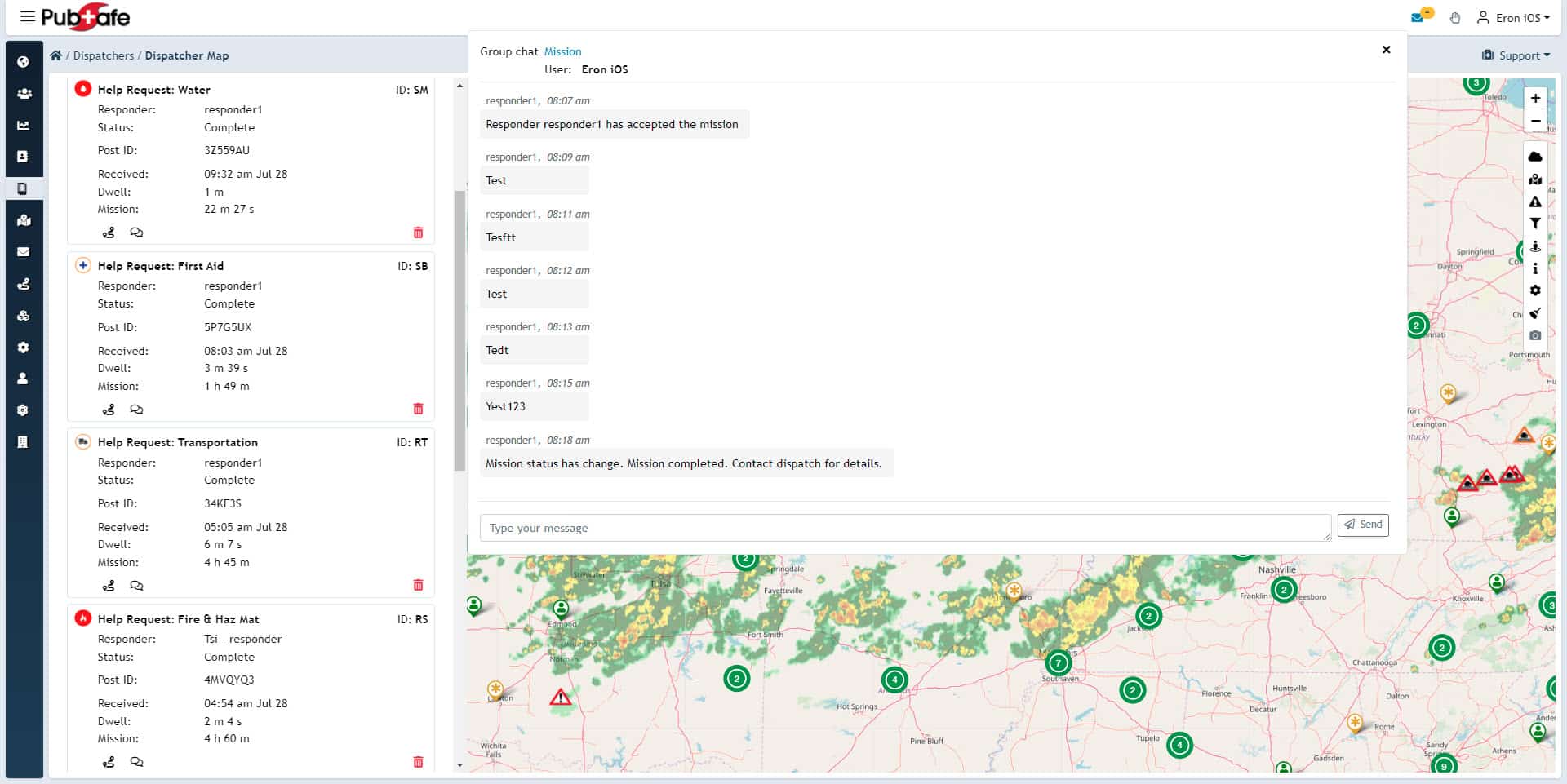
Clear and consistent communication is the lifeblood of incident management. Throughout the response, it’s vital to keep all stakeholders informed. This includes the affected public, internal response teams, government agencies, and media outlets. A centralized communication platform helps share real-time updates on the incident’s progress, issue safety warnings, and coordinate actions among different groups. Using tools like a shared public map can provide everyone with a common operating picture, reducing confusion and building trust. This transparency ensures that everyone is working with the same information, which is crucial for a unified and effective response.
Step 4: Investigation and Resolution
As the response unfolds, teams work to find the root cause and resolve the incident. In a disaster context, this means moving from initial containment to active resolution. Teams on the ground investigate the full extent of the damage, identify ongoing risks, and implement solutions to stabilize the situation. This could involve search and rescue operations, putting out fires, or providing medical aid. Sometimes, outside experts are brought in to assist with complex challenges. The goal is to neutralize the immediate threat and transition the area from a state of emergency to a state of safety, paving the way for recovery.
Step 5: Recovery and Closure
Once the immediate danger has passed, the focus shifts to recovery. This final stage involves fixing the problem and ensuring services are fully restored. Recovery means more than just clearing debris; it includes conducting thorough damage assessments, testing infrastructure to ensure it’s safe, and providing support to the affected community as they begin to rebuild. The incident is formally closed when all recovery actions are complete and operations are back to normal. This step also includes documenting lessons learned to improve the response process for future events, making the community more resilient.
Leading the Response: The Role of the Incident Commander
At the heart of any organized response is the Incident Commander. This individual is responsible for the overall management of the incident, setting objectives, and directing all response activities. According to experts at Xurrent, the Incident Commander’s duties include assessing the situation, establishing a command structure, and ensuring the safety of all responders. They use incident management software to maintain situational awareness, communicate with team leaders, and make informed decisions under pressure. A strong Incident Commander provides the clear leadership needed to guide the entire operation through the lifecycle, from initial diagnosis to final recovery.
Must-Have Features for Your Incident Management Software
Choosing the bestRobust incident management software can significantly impact organizational efficiency. Certain features make the software more effective in handling incidents. Identifying these features is crucial during selection.
Automation is an essential feature to consider. It helps streamline repetitive tasks, saving time and reducing errors. Real-time alerts ensure prompt responses to incidents, further minimizing potential disruptions.
Look for software with robust integration capabilities to allow seamless communication with other systems and tools. A user-friendly interface is also crucial, as it enhances user adoption and reduces the learning curve.
Your Feature Checklist
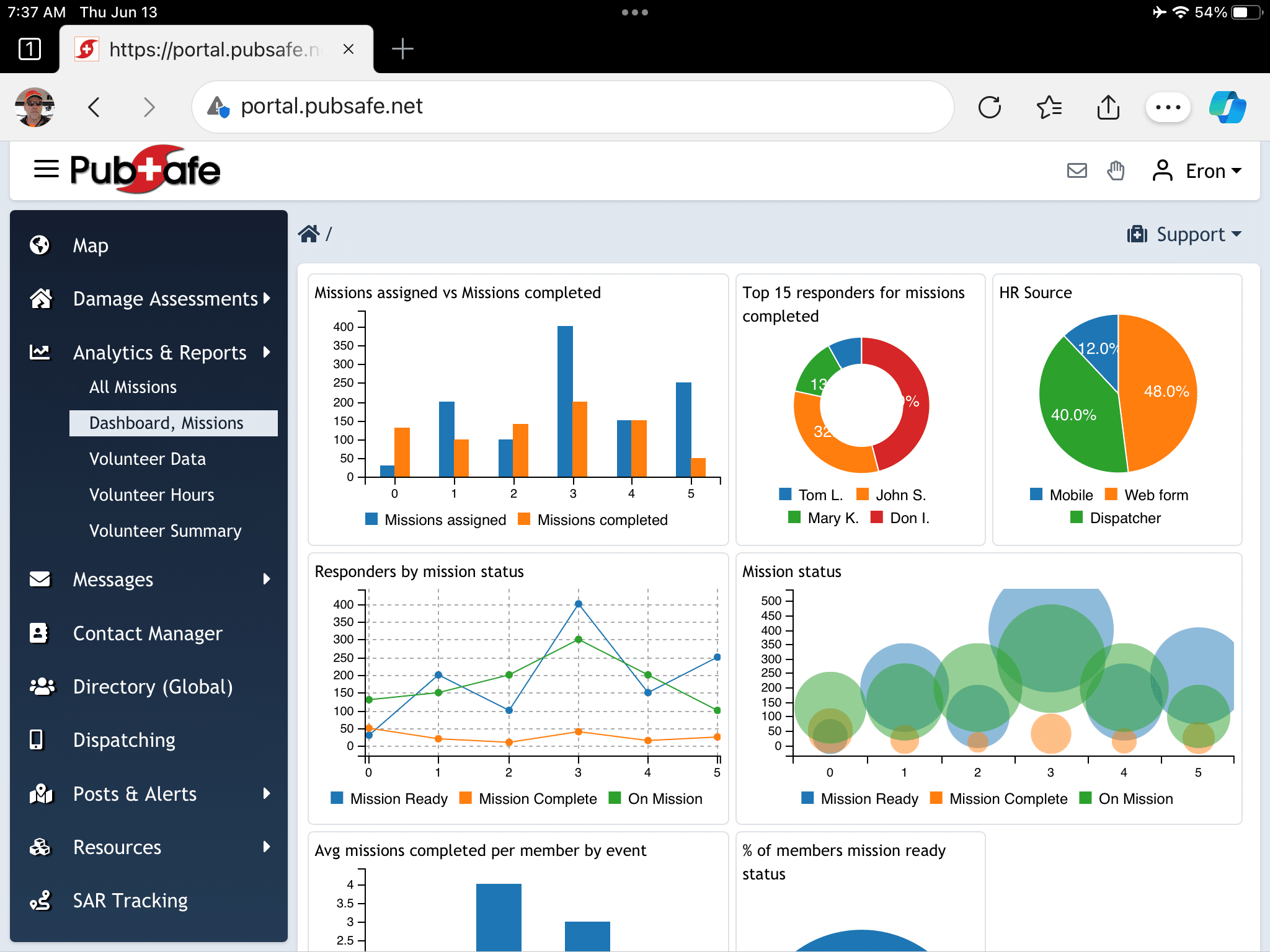
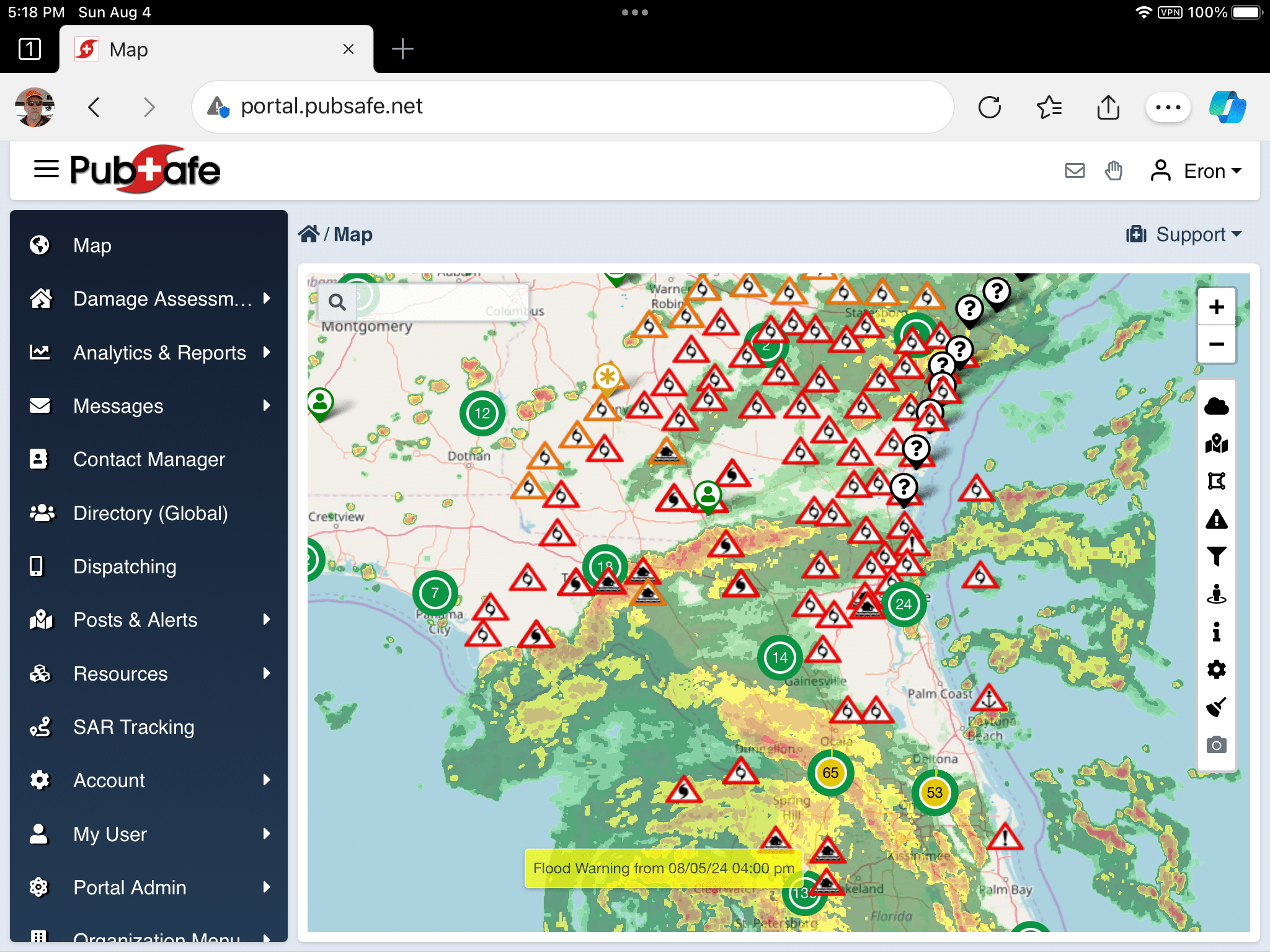
- Robust mapping with global maps, filter functions, weather, team tracking, real-time data, etc.
- Online access for working anywhere
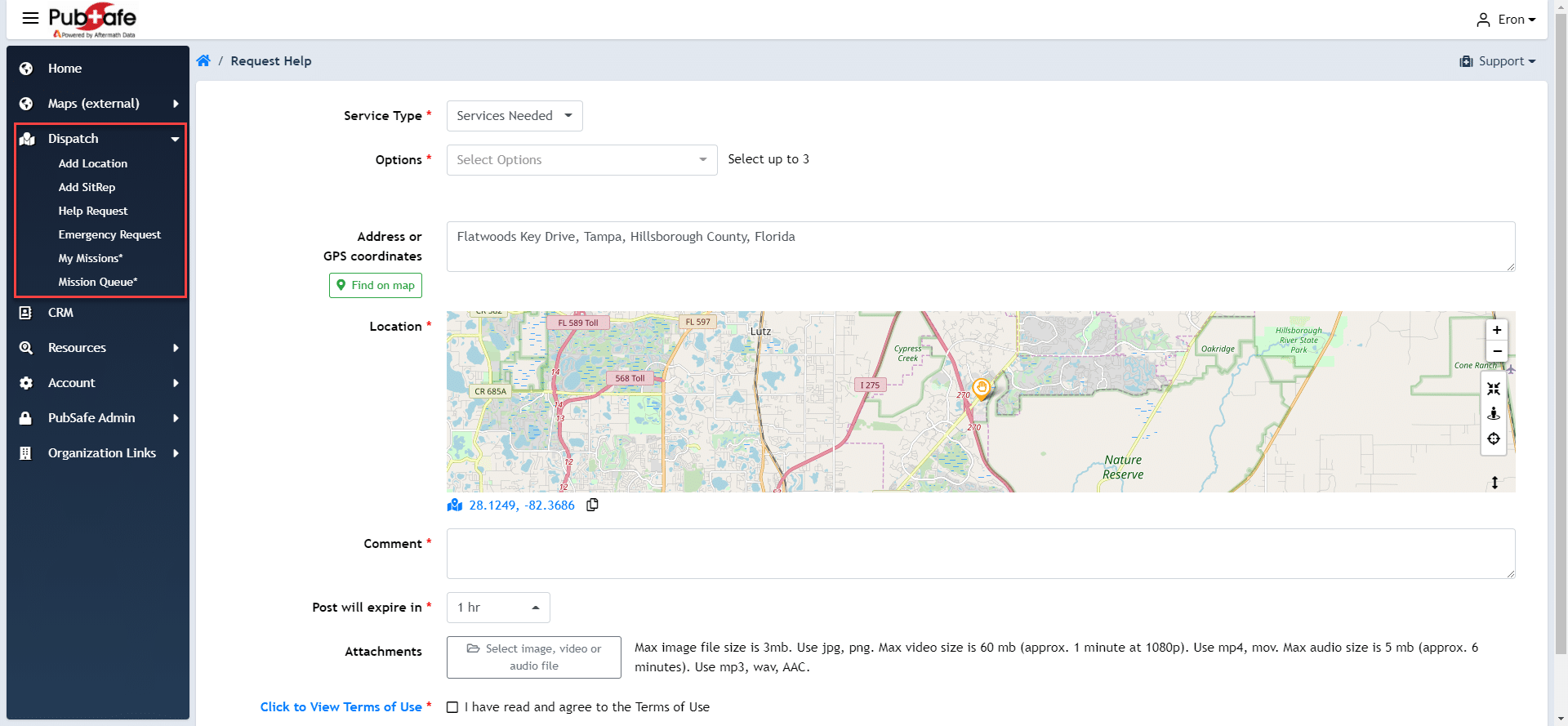
- Work order management to communicate what needs to be done, what gets done, and the disposition of the request
-
A contact manager to eliminate the need for online spreadsheets, ensuring information is readily available to authorized people and not lost from one emergency or disaster to another.
- Tracking teams in the field for work order assignment, with proximity to the help request being critical to a rapid response
- Real-time alert systems
- User-friendly interface
- Reporting and analytics with search, sort, and filter options
- Real-time information
- Automated on boarding of users and volunteers
- Selecting software that encompasses these elements will support your NGO efficiently. These features enhance incident response, reducing downtime and improving service quality.
On-Call Scheduling
Effective incident management starts with knowing you have the right people ready to act at a moment’s notice. On-call scheduling is the feature that makes this happen. It’s a system for organizing your team to ensure that skilled responders are always available to handle an incident, no matter when it occurs. For disaster response organizations, this isn’t just about IT support; it’s about mobilizing volunteers and staff with specific expertise—like medical training or search and rescue skills—to the areas where they’re needed most. A good system helps you manage rosters, track availability, and automatically notify the correct personnel, which is critical for rapid and effective volunteer coordination during emergencies.
Integrated Status Pages
During a crisis, clear and timely communication is everything. Integrated status pages provide a single, reliable source of information for the public, partner agencies, and internal teams. Instead of fielding hundreds of individual calls and messages, your organization can direct everyone to a central hub for real-time updates. This builds trust with the community and frees up your team to focus on the response itself. For example, a status page could be a public map showing active incidents, road closures, or the locations of shelters and aid stations. By automating these updates, you ensure everyone has access to the most current information, which helps keep people safe and manage expectations effectively.
Post-Mortem and Reporting Tools
The work isn’t over when the incident is resolved. The most resilient organizations are those that learn from every experience. Post-mortem, or after-action, reporting tools are essential for this process. They help your team analyze the entire incident lifecycle: what was the initial report, how quickly did you respond, what actions were taken, and what was the outcome? Compiling this data allows you to identify strengths and weaknesses in your response plan. Strong reporting features make it easier to generate insights, share findings with stakeholders, and implement improvements for the next event. This commitment to continuous improvement is what helps teams save more lives and better protect communities over time.
ChatOps Integration
Coordination is the backbone of any successful disaster response, and ChatOps brings your communication and operations together in one place. This feature integrates your incident management platform with chat tools your team already uses, like Slack or Microsoft Teams. It allows responders to collaborate, share files, and execute commands directly from a chat window, creating a centralized command center for the incident. This seamless flow of information ensures that everyone, from the field teams to the operations center, is working with the same data in real time. A platform that facilitates this level of integrated communication is key to making swift, informed decisions when every second counts, which is a core part of how PubSafe works to connect all stakeholders.
Free vs. Paid: What’s the Real Cost?
Budget considerations are vital when selecting incident management software. Different pricing structures can affect your final decision. Software A and C might offer tiered pricing, accommodating small teams and large enterprises alike. Software B, on the other hand, might provide a flat-rate model, simplifying cost management.
When evaluating costs, consider the value each tool provides beyond its price tag. Look for incident management software that balances cost with crucial features and functionalities. Many providers offer free trials that allow you to evaluate how the software aligns with your needs before committing financially.
What to Consider Before You Buy
- Tiered vs. flat-rate pricing models
- Monthly or annual payment
- Availability of free trials and demos
- Contract or month-to-month service
- Add-on costs for additional modules or flat rates
- Fees for the web portal, mobile app, or both
Defining Your Service Level Agreements (SLAs)
Think of a Service Level Agreement (SLA) as a formal promise between you and your software provider. This document outlines exactly what you can expect in terms of service performance, like system uptime and how quickly their support team will respond to your issues. For disaster response teams, this isn’t just a nice-to-have; it’s critical. When you’re in the middle of an emergency, you need to know your communication and coordination platform will be reliable and that help is available if something goes wrong. A solid SLA clearly defines key metrics, responsibilities, and what happens if the service doesn’t meet the agreed-upon standards. Before you commit to any incident management software, make sure you review its SLA carefully. It’s your guarantee that the tool will be there for you when your community needs it most.
Is Paid Incident Management Software Worth It?
Consider this scenario. You select free incident management software because other incident management platforms cost $90/year per user. Over the years, your NGO becomes reliant on it to operate, saving member emergency contact information, vehicle descriptions, relationships, and more.
One day, you realize you can no longer log in. You try to contact the provider, but no one answers the phone. The website support email returns undelivered. Who do you turn to for help? How do you get the information out of the incident management software?
The next day, it is reported that the “company” providing the software exported your data and is selling it on the dark web. Your name, email, cell phone, drivers license, and passwords are being share by criminals online. Now you must contact everyone entered over the last five years to inform them of the cyber breach, or the officers face stiff fines.
When a real company charges for services, it pays for cybersecurity, portal software development, servers, internet access, mobile app development, insurance, travel, trade shows, accounting software and CPAs, lawyers, marketing budgets, and staff. Without a fee and a reasonable profit, there is no incentive to provide a reliable, secure, and improving platform. With a profit, the software owner will work quickly to resolve issues. Without profit, key functionality may take weeks or months to fix, or the portal may just be taken down.
Comparing the Top Incident Response Software
User feedback is crucial when evaluating incident management tools. Many professionals emphasize the importance of usability and swift setup. Software A, for instance, is commended for its automation, allowing users to handle incidents with minimal effort. Users report that its integration capabilities vastly improve workflow efficiency.
Conversely, Software C garners praise for its scalability and data insights. Users find its analytics invaluable for preemptive action against recurring issues. On the other hand, Software B is often highlighted for its intuitive design, simplifying the user experience. Across the board, user testimonials highlight these tools’ positive impacts.
User experiences also highlight the importance of customer support and community engagement. Many users appreciate platforms that offer responsive customer service, as it can significantly impact their ability to resolve issues quickly. For instance, Software D is often praised for its dedicated support team, which provides timely assistance and resources for troubleshooting. Additionally, a strong user community can foster knowledge sharing and best practices, allowing organizations to learn from one another and enhance their incident management strategies. This collaborative environment not only improves user satisfaction but also contributes to the software’s overall effectiveness in real-world scenarios.
Types of Incident Management Tools
Not all incident management tools are created equal. The software landscape is diverse, with different platforms designed for very specific types of problems. Some are built to handle a server outage, while others are designed to coordinate a response to a hurricane. Understanding these categories is the first step in finding the right fit for your team. From comprehensive IT suites to specialized community response platforms, each type offers a unique set of features tailored to a particular challenge. Let’s look at the main categories you’ll encounter and what they’re best suited for.
IT Service Management (ITSM) Suites
IT Service Management (ITSM) suites are the traditional heavyweights in the incident management world. These platforms are typically designed for corporate IT departments to handle internal issues like software bugs, network outages, or hardware failures. Think of them as the command center for keeping a company’s digital infrastructure running smoothly. While they are powerful for tracking tickets and managing IT workflows, their focus is almost exclusively on technology-related incidents. They provide structured processes for logging, categorizing, and resolving technical problems, but they aren’t built to manage the dynamic, on-the-ground needs of a community disaster response.
AI-Driven Platforms
A newer category of tools uses Artificial Intelligence (AI) to automate and improve the incident response process. These platforms can analyze incoming data to predict potential incidents, automatically route issues to the right person, and even help write post-incident reports to prevent future problems. For example, some tools use AI to quickly summarize what went wrong after a system failure, saving teams hours of manual work. While often focused on the IT and software development world, the application of AI in incident management shows how technology can speed up analysis and resolution, a principle that’s valuable in any type of crisis.
Open-Source Solutions
For organizations with technical expertise and limited budgets, open-source solutions can be a great option. These tools are often free to use, and their underlying code can be modified to fit specific needs. A well-known example in the cybersecurity space is TheHive, which is designed for security incident response. The biggest advantage is flexibility and cost savings. However, the trade-off is that they usually require more technical skill to set up and maintain. Support typically comes from a community of users rather than a dedicated customer service team, which can be a challenge for non-technical organizations during a critical event.
Community and Disaster Response Platforms
This category of software is built specifically for real-world emergencies like floods, wildfires, and tornadoes. Unlike IT-focused tools, these platforms are designed to manage people, resources, and communication across different organizations in a chaotic environment. They prioritize features like real-time mapping, volunteer and team management, and field data collection. For example, a platform like PubSafe connects citizens, NGOs, and official agencies on a single map, allowing everyone to see where help is needed and who is responding. This focus on collaboration and situational awareness is essential for effective disaster response, making these tools indispensable for public safety and humanitarian organizations.
Choosing a Tool for Your Use Case
The most important factor in selecting an incident management tool is your specific use case. A tool that’s perfect for a software company will be completely ineffective for a search and rescue team. The key is to look past the marketing and focus on what the software actually does. Does it help you manage digital assets or physical ones? Is it designed for a handful of internal experts or a large network of community volunteers? Answering these questions will help you narrow down the options and find a platform that truly supports your mission.
Tools for IT/DevOps vs. Security Incidents
Within the digital world, there’s a big difference between a standard IT incident and a security breach. IT and DevOps tools are focused on reliability and uptime—their goal is to fix a broken system and restore service as quickly as possible. Security incident tools, on the other hand, are geared toward investigation and containment. Their priority is to understand the attack, stop it from spreading, and preserve evidence. This distinction is critical, but it also highlights why neither is suited for community disasters. A disaster response requires coordinating people and physical resources, not just fixing code or patching a server, which is why specialized incident reporting and management platforms are essential for those on the front lines.
Best Practices for Effective Incident Management
Having the right software is a great start, but the best tools are only as effective as the strategies behind them. To truly get the most out of your incident management platform, it’s important to build solid processes that guide your team’s actions. These practices help ensure that when an incident occurs, your response is swift, coordinated, and effective. It’s about creating a framework for success that turns chaos into a structured, manageable process. By focusing on preparation, analysis, and continuous improvement, your organization can handle emergencies with greater confidence and achieve better outcomes for the communities you serve.
Implementing these best practices doesn’t have to be complicated. It starts with clear planning and a commitment to learning from every experience. From creating detailed response plans to analyzing what happened after the fact, each step builds your team’s resilience and capability. This proactive approach not only improves how you handle current incidents but also helps you anticipate and mitigate future ones. Let’s explore some of the core practices that can transform your incident management approach from reactive to strategic, ensuring your team is always prepared for what’s next.
Develop Incident Response Playbooks and Runbooks
Think of an incident response playbook as your team’s game plan for an emergency. It’s a document you create ahead of time that outlines exactly what to do when a specific type of incident occurs. This plan should clearly define what constitutes a major incident, establish communication protocols, and identify who is on the response team and what their roles are. Having this strategy documented ensures that everyone knows their responsibilities, which minimizes confusion and speeds up response times. When everyone is on the same page, your team can execute a coordinated response instead of scrambling to figure out the next steps in the middle of a crisis.
Conduct Root Cause Analysis to Prevent Future Incidents
After an incident is resolved, the work isn’t over. Conducting a post-incident review is one of the most valuable things your team can do. This is a blameless debrief where you analyze what happened, what went well, and where there were weaknesses in your response. The goal isn’t to point fingers but to identify the root cause of the problem so you can prevent similar incidents from happening again. This process of continuous learning helps you refine your playbooks, improve your processes, and strengthen your overall response strategy, making your team more effective and resilient for the next event.
Focus on Key Metrics like MTTR
In the world of disaster response, time is everything. One key metric to track is Mean Time to Resolution (MTTR), which measures the average time it takes to resolve an incident from the moment it’s first reported. Focusing on reducing your MTTR means you’re actively working to restore normalcy for the affected community faster. Tracking this metric helps you identify bottlenecks in your workflow and find opportunities for improvement. For example, if you notice that assigning tasks is taking too long, you can adjust your process to deploy resources more efficiently. Ultimately, a lower MTTR means your team is providing help more quickly and effectively.
Reduce Alert Fatigue for Your Team
Your volunteers and team members are your most valuable asset, but they can easily get overwhelmed if they’re bombarded with constant, irrelevant notifications. This is known as alert fatigue, and it can cause people to tune out or miss critical updates. The best incident management software helps you avoid this by using smart notifications and escalation rules. This ensures that alerts are sent only to the specific people or teams who need to act on them. By targeting your communications, you protect your team’s time and attention, keeping them engaged and ready to respond when it truly matters for effective team management.
Beyond Response: How to Prevent Incidents
While a fast and effective response is critical, the ultimate goal is to prevent incidents from happening in the first place. A proactive approach to incident management involves identifying potential risks and taking steps to mitigate them before they escalate into full-blown emergencies. This means shifting some of your focus from reaction to prevention. By analyzing past incidents and understanding common hazards, your organization can develop strategies to improve safety and build a more resilient community. This forward-thinking mindset not only saves resources but, more importantly, can save lives by stopping disasters before they start.
Prevention involves a combination of planning, community outreach, and ongoing training. It’s about creating a culture of preparedness where everyone understands their role in maintaining safety. For example, public awareness campaigns about wildfire safety or flood preparedness can empower citizens to take protective measures. Similarly, regular infrastructure checks and hazard assessments can identify vulnerabilities that need to be addressed. By investing in prevention, you’re not just managing incidents—you’re actively working to create a safer environment for everyone, reducing the frequency and severity of emergencies over the long term.
The Role of Education and Training
Perhaps the single most powerful tool for incident prevention is education and training. When your team members and the public are well-informed about potential hazards, safety procedures, and the proper use of equipment, the risk of incidents drops dramatically. Regular training sessions and drills are essential for reinforcing your response playbooks and ensuring everyone knows how to act decisively during an emergency. Using your incident management platform for simulated exercises can be an incredibly effective way to practice your response in a controlled environment, allowing your team to build muscle memory and identify gaps in your plan before a real crisis hits.
How to Get Started With Your New Software
Successfully implementing incident management software is a crucial strategic decision. Start by training your team on the features and workflows. Education ensures everyone knows how to use the software efficiently. A free trial is important to getting the team going during the on boarding phase.
Next, try to integrate some of the current processes and information into the incident management software. Making a new platform like the old one should not be the goal. Familiar, yet new, will make the transition easier. Regular reviews and feedback will help refine processes and improve overall adoption rates.
What’s Next in Incident Management?
Incident management is evolving with new technologies. Expect advancements in AI and machine learning to enhance automation. Predictive analytics will become key for proactive responses. Watch for increased integration capabilities, driving seamless operations across diverse environments. These trends promise to redefine incident management processes in the coming years.
The Rise of AI and Automation
Artificial intelligence and automation are quickly becoming essential in modern incident management. These technologies help teams process vast amounts of information, identify patterns, and make faster, more informed decisions. For response organizations, this means a significant improvement in detecting incidents early and coordinating a collaborative response. Instead of manually sifting through data, teams can rely on AI to highlight critical alerts and suggest initial actions, streamlining the workflow from the moment an incident is reported. This shift allows organizations to move from a reactive to a more proactive stance.
The real power of this technology is its ability to handle routine tasks, freeing up human responders for what they do best: problem-solving and providing support. Teams can safely delegate repetitive jobs, like sending initial alerts or categorizing reports, to automated systems. This ensures skilled personnel can focus on complex situations that require critical thinking and human empathy. While AI-driven tools are effective at spotting anomalies, they are most powerful when they augment, rather than replace, the judgment and experience of people on the ground.


