
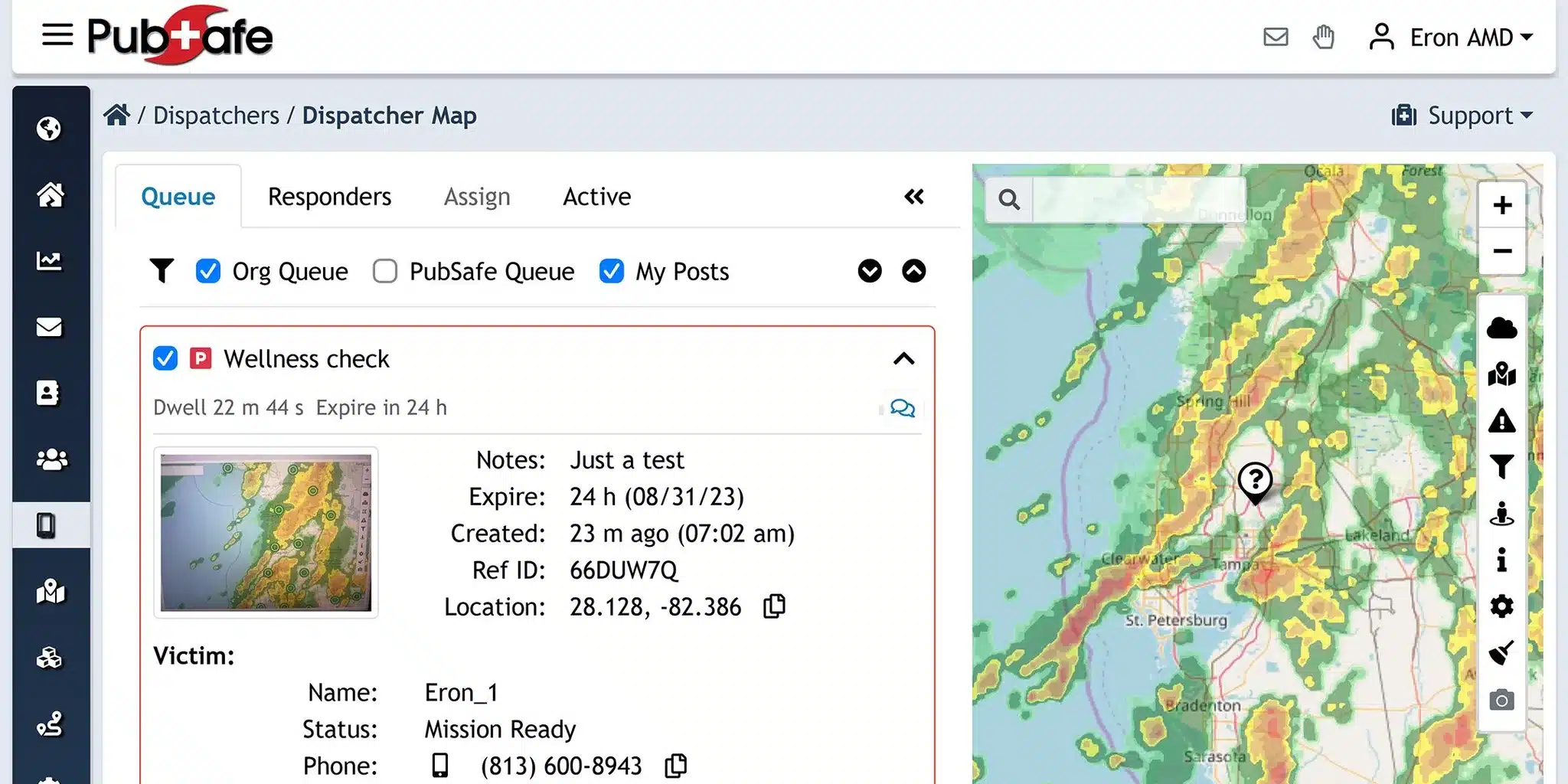
During a disaster, a small NGO can lose time when updates, volunteer lists, maps, and field reports are scattered across unrelated tools. A platform may look impressive in a sales demo. It can still be difficult for a lean team to deploy, afford, or use. This matters when volunteers work from phones and connectivity is uneven.
To understand how to evaluate emergency management software for a small NGO, test whether it gives your team timely incident visibility. Practical volunteer coordination, mobile access, appropriate permissions, useful reporting, interoperability with existing tools, responsive support, and a clear total cost.
The right choice is not the system with the longest feature list. It is the one your staff and volunteers can use consistently, while preserving human judgment and fitting the way your organization actually responds. Start by separating essential operational requirements from attractive extras.
What Should a Small NGO Require From Emergency Management Software?
Small NGOs should evaluate emergency management software against the realities of volunteer-led operations. Do not compare a lean team with a municipal enterprise feature list.
Lean teams need a platform that is easy to deploy and simple to learn. It must also be practical when staff coordinate people under pressure.
The right question is not, “How many features does this platform have?” Ask instead, “Can our team use the essential features immediately and consistently?”
Fragmented communication is a common risk during disasters. This is especially true when teams depend on tools that were not designed for emergency response. A central coordination layer can reduce noise, but it should support human judgment rather than attempt to replace it.
This checklist narrows the evaluation to small-NGO requirements. For broader background, see the broader emergency management software guide.
Start with the requirements your team cannot work without
Before booking demonstrations, identify the minimum operating model your organization needs. Keep the list short enough that a volunteer coordinator can explain it to a new team member without a training manual. Then test each requirement using a realistic incident scenario.
- Confirm immediate usability. Ask whether the platform can be deployed with an out-of-the-box workflow, rather than requiring extensive configuration before your team can respond. A small NGO may not have a dedicated administrator, so setup effort is a core buying criterion, not an implementation detail.
- Test the essential coordination workflow. Require a clear way to organize response activity and keep relevant information together. The system should help your team avoid switching between disconnected conversations and applications. If a volunteer cannot tell where to find the current information, the feature set is not solving the operational problem.
- Check field practicality. Include mobile access and ease of use in the initial requirements. Volunteers and field teams may be moving, sharing updates, or working with limited time. A platform that looks capable in a desktop demonstration but is difficult to use away from a desk should not pass the first review.
- Examine affordability without reducing the test to price. Look for a clear cost structure that fits nonprofit budget constraints and preserves essential functionality. Record subscription, setup, training, support, integration, and future growth considerations so the team can compare total cost rather than a single headline figure.
- Set a practical pass or fail standard. Weight must-have requirements more heavily than attractive extras. If the platform fails on deployment, usability, or core coordination, advanced features should not rescue it. Document the gaps, the workarounds, and who would own each workaround before moving forward.
1. Can You See Incidents, People, and Resources in One Place?
A small NGO cannot afford to reconstruct the situation from scattered texts, spreadsheets, radio updates, and email threads. During an active response, the platform should give coordinators a current view of what is happening, who is available, and which resources are already committed. Real-time incident visibility and volunteer coordination are core requirements for small organizations, not optional enterprise features.
Test the operational picture, not just the dashboard
Ask a vendor to demonstrate a realistic scenario. Can a coordinator open an incident, record its location, assign people, and update the status of supplies or vehicles without switching between several systems? Resource tracking should support both routine operations and larger disasters, so the same information remains useful as the response changes. Look for clear ownership of each task and an obvious way to see what still needs attention.
Mapping is part of that operational picture. A map should help the team understand where incidents, volunteers, affected areas, and resources are located, then support practical dispatch and routing decisions. It should complement human judgment rather than replace it. Also ask whether the platform can work alongside existing radio, mapping, or other field tools. Interoperability matters when an NGO already relies on equipment and services that responders know how to use. For more detail on this capability, see PubSafe’s incident visibility and management resources.
Make field access a pass-fail requirement
Information that exists only in an office dashboard is of limited value to a team moving through an incident area. Mobile access should let field personnel view relevant incident details and enter updates while they are on the move. Mobile-first design also makes it more practical to capture information accurately and update it promptly, which supports team safety and coordination.
Test the mobile experience with the people who will actually use it. Have a volunteer find an assigned task, review the location, report a change, and confirm that the coordinator can see the update. Check whether the interface remains understandable under pressure and whether users can access only the information appropriate to their role. A system that helps automate routine volunteer tasks can reduce administrative burden, leaving coordinators more time for response decisions. For a deeper look at organizing volunteers, explore PubSafe’s volunteer coordination software guidance.
2. Does It Protect Information Without Slowing Response?
For a small NGO, information protection should make coordination clearer, not create another obstacle during a fast-moving incident. Start by asking what each person needs to see and do. A volunteer may need an assignment and location. A team lead may need broader situational awareness. An incident coordinator may need access to reports, rosters, and resource status. The software should support those distinctions through practical roles and permissions, so sensitive information reaches the right teams without exposing every record to every user.
Can permissions support real response roles?
Look for controls that let administrators assign access by role, team, or incident. Test the process with realistic users, including a new volunteer, a field lead, and an administrator. Can someone be added quickly? Can access be changed when an assignment ends? Are private volunteer details separated from information that the wider response team needs? These questions matter because privacy is an operational responsibility, not just an administrative setting. The platform should also explain its security protocols, including how it protects communications and controls access. Do not accept a certification claim or security guarantee without documentation that you can independently review.
Reporting is another test of whether protection helps or hinders the mission. A centralized record can preserve incident history, resource activity, and field reporting for post-incident review or grant documentation. Reports should be easy to find and generate while still respecting the permissions assigned to users. Ask whether the system provides useful filters, exports, or audit information, and whether reports can be produced without manually combining scattered messages and spreadsheets. PubSafe describes this broader role in its civilian disaster response software resources.
Does it connect the channels teams already use?
Interoperability should be part of the demonstration, not a promise reserved for a future roadmap. Emergency teams may rely on radios, mapping tools, SMS, app alerts, or email. A platform does not need to replace every tool, but it should help preserve a shared operational picture across them. Ask what data can move between the platform and mapping or radio workflows, what remains manual, and how errors are handled. Multi-channel communication can help reach members wherever they are, while integrated situational awareness reduces the noise created by standalone messaging apps.
3. Will Volunteers Actually Use It During a Real Incident?
A platform can offer every desired feature and still fail if volunteers cannot use it under pressure. Small NGOs should evaluate the experience from the responder’s point of view, not only from an administrator’s dashboard. Ask whether a new volunteer can understand the next action, find the relevant incident, and send a useful update without a long training session or repeated help requests.
Test the first five minutes
Invite someone who was not involved in the software selection to complete a short onboarding exercise. Give the volunteer a role, a simulated assignment, and only the instructions they would realistically receive. Watch for confusion around account setup, notifications, incident selection, task acceptance, and status updates. User-centric design should reduce the learning curve and support rapid mobilization when time matters, while still leaving operational decisions with trained people.
Repeat the exercise on a phone, using the connection and lighting conditions volunteers may encounter in the field. The mobile workflow should make it practical to view an assignment, confirm availability, capture an update, and see changes without relying on a desktop. Buttons, labels, and forms should be clear enough for users with different levels of technical confidence. Check accessibility basics as well, including readable text, logical navigation, and alternatives when a user cannot interact with the device in the usual way.
Run a realistic adoption scenario
Use one brief scenario rather than a polished product tour:
- A coordinator creates an incident and assigns two volunteers.
- One volunteer accepts the task from a mobile device and reports a change in conditions.
- The coordinator updates the assignment, sends a notification, and verifies that the volunteer sees it.
- The team records the outcome and retrieves the information for a later review.
Time each step, record every question, and note where the process depends on a specific person’s memory. Then repeat the scenario with a volunteer who has not used the platform recently. This reveals whether onboarding, refresher training, and in-product guidance are strong enough for a volunteer organization with limited staff capacity.
Finally, ask the vendor how support works when the organization needs help during preparation or response. Clarify response channels, documentation, training resources, update practices, and how the platform behaves when conditions are difficult. Reliability is not a promise to accept blindly. It is something to assess through repeatable tests, clear support expectations, and evidence that the vendor understands emergency operations. Training and user adoption deserve the same attention as the feature list.
4. What Is the Total Cost for a Small NGO?
The cost of emergency management software is more than the recurring subscription or license. For a small NGO, the better question is whether the platform can be adopted quickly and remain dependable as volunteer participation changes. It should also preserve useful records when your needs evolve. A clear cost review should cover the full operating life of the tool, not just the first proposal.
Use the comparison below when reviewing vendors. Ask each one to identify what is included, what requires staff time, and what creates a separate dependency. A transparent answer is often more useful than a long feature list.
Questions for every vendor
Small NGO cost questions
| Cost area. | What to compare. | Questions to ask. |
|---|---|---|
| Subscription or licensing. | Included users, roles, core features, and any usage limits. | Is the structure clear enough for a nonprofit budget? Can you forecast the cost as participation changes? |
| Setup and configuration. | Account creation, workflows, permissions, imports, and launch support. | What can a lean team complete without specialist help? What staff time is required before the first incident? |
| Training and adoption. | Coordinator training, volunteer onboarding, documentation, and refresher needs. | Can occasional volunteers learn the essential workflow without a lengthy training program? |
| Support and reliability. | Support channels, response expectations, maintenance, and vendor communication. | Who helps when the team is preparing for or managing a live response? |
| Integrations and data flow. | Connections to communication, mapping, reporting, or field tools. | Are integrations included, stable, and interoperable with the tools you already depend on? |
| Volunteer growth. | Adding members, teams, locations, and incident activity over time. | Does the platform scale from a community response to a broader operation without forcing a disruptive change? |
| Export and switching. | Access to historical records, reports, contacts, and operational data. | Can you export usable data if your organization changes tools? What work would migration require? |
Do not treat low initial effort as low total cost if volunteers struggle to use the system or coordinators must rebuild records elsewhere. Training and adoption are as important as feature depth, while scalability helps an NGO maintain coordination as operations expand. Support and vendor reliability also matter because a failure during a disaster can affect response work.
How Do You Validate a Shortlist Before Choosing?
A polished demonstration is not evidence that a platform will work for a small NGO. Validate each finalist against the work your coordinators and volunteers actually perform, then record what happened. A tool that is easy to deploy and usable without extensive configuration is especially important when a lean team may need out-of-the-box capability during a fast-moving incident. Review the operational context behind these requirements before you schedule vendor conversations.
Run the same scenario with every finalist
- Start with a normal operating day. Ask the vendor to show how a coordinator creates an incident, assigns volunteers, tracks resources, shares updates, and produces a basic report. Use your own terminology and sample workflow. Note how many steps are required, which fields are mandatory, and whether a new volunteer could understand the process without one-to-one coaching.
- Test a surge response. Introduce a second incident, changing conditions, competing assignments, and volunteers working from the field. Ask what happens when information changes quickly. Check whether coordinators can see current assignments and incident details in one place, while authorized users receive the information relevant to their role. Test mobile access in the locations and connectivity conditions your teams commonly face.
- Ask practical demo and trial questions. Request a clear explanation of onboarding, training, technical support, updates, and expected response when the platform fails. If a vendor offers a trial or evaluation environment, confirm its scope and duration rather than assuming full functionality. Ask whether your organization can export its records in a usable format, including incident history, volunteer information, and reports.
- Score evidence, not promises. Create a simple scorecard with weighted categories such as usability, incident visibility, volunteer coordination, mobile access, permissions, reporting, interoperability, support, and total cost. Mark each item as demonstrated, partially demonstrated, or unanswered. Treat a missing answer as a follow-up task, not as proof that the feature exists.
- Review the roadmap and secure sign-off. Ask how frequently the product is updated and which planned changes affect your response model. Compare the roadmap with current gaps, but do not award points for undelivered functionality. Share the completed scorecard with coordinators, volunteer leads, data owners, and organizational leadership. Training and user adoption matter as much as the feature list, so require agreement from the people who will use the system under pressure.
Frequently Asked Questions
What is the most important feature for a small NGO?
Start with a shared operational picture. The platform should let your team see active incidents, coordinate volunteers, track resources, and update information from the field. Real-time visibility and mobile access usually matter more than a long list of advanced features that volunteers will rarely use.
How can an NGO test whether volunteers will use the software?
Run a short, scenario-based exercise with the people who would use it during an incident. Ask volunteers to accept an assignment, view a map, submit an update, and find the latest instructions on a phone. Watch where they hesitate, then confirm whether training, accessibility, and support address those gaps.
What security and permission controls should we look for?
Look for role-based access that gives each person the information and actions appropriate to their responsibilities. Ask how the system protects sensitive volunteer and incident information, how access is removed, and whether administrators can review or export activity for accountability.
How should a small NGO compare software costs?
Compare the full operating cost, not only the subscription. Include setup, training, support, integrations, data export, and the cost of adding volunteers or handling a larger incident. Request a clear explanation of what is included, and test whether the platform delivers essential coordination without expensive extras.
Ready to Evaluate Your Options?
A practical demo can help your team compare coordination needs against the tools you already use, while keeping volunteer workflows and response priorities in view. Contact us to discuss how the free PubSafe app may support emergency coordination for your organization. Contact PubSafe and bring the checklist, your real-world scenarios, and any questions about fit.


