
Organizing a missing person search often feels like trying to assemble a puzzle in the dark. You have dedicated volunteers and professional teams, but getting everyone on the same page is a huge challenge. How do you see where teams have already covered? How do you send an urgent update to everyone at once without relying on messy group texts or radio chatter? The key is a central hub for information and communication. This guide walks through how to use the PubSafe platform to create a real-time operational map, allowing you to track every volunteer, mark evidence, and communicate efficiently, turning a disjointed effort into a cohesive and powerful search operation.
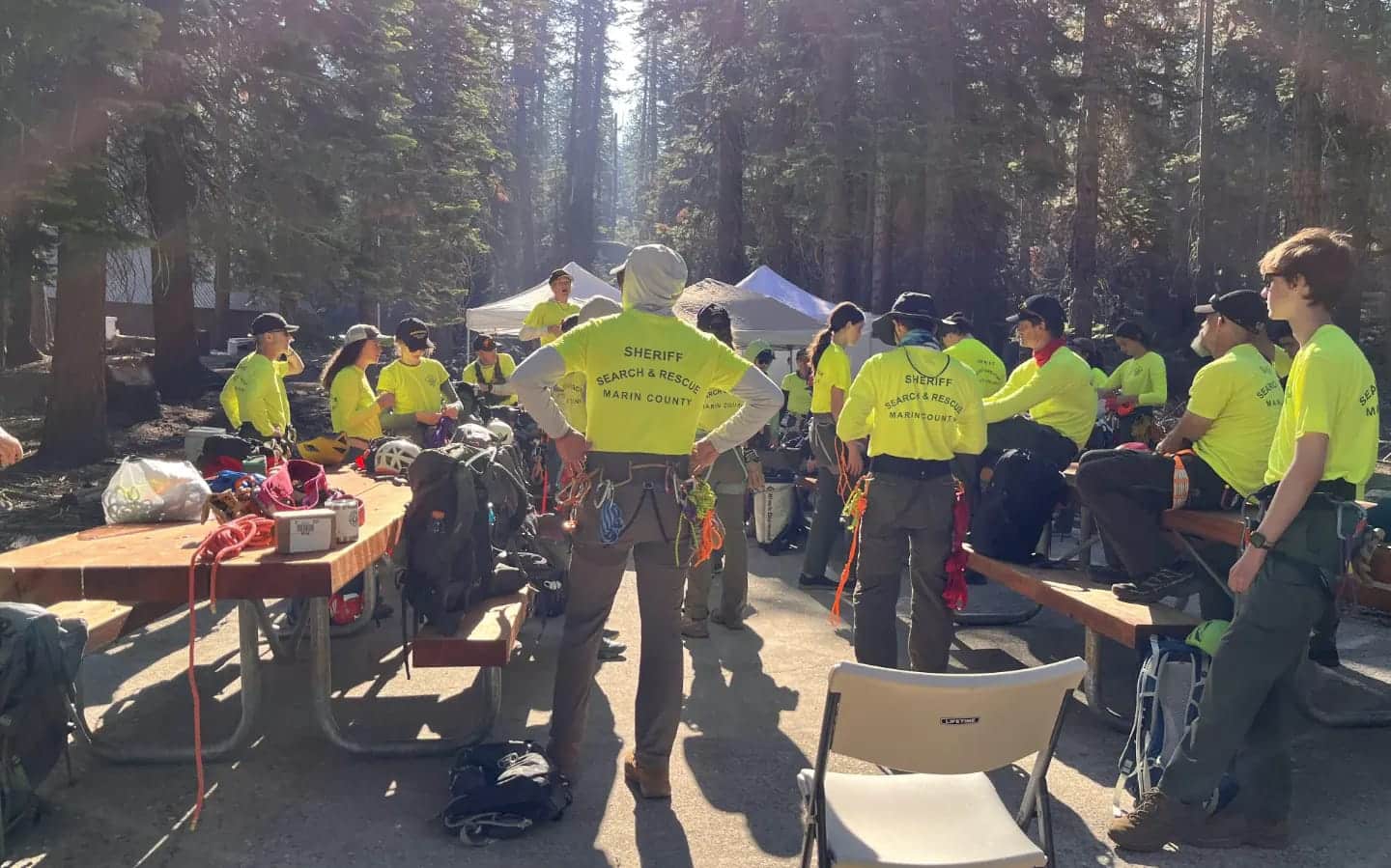
PubSafe for Command & Control
The PubSafe platform offers access to information essential to the command and control of search party operations. The free PubSafe mobile app can be used to share the location of search party members, along with other data.
The free version of the PubSafe mobile app provides user location tracking available to all PubSafe users in the app. Upgrading to Pro for a search party provides track history and communication on a temporary basis for all search party members via the web portal.
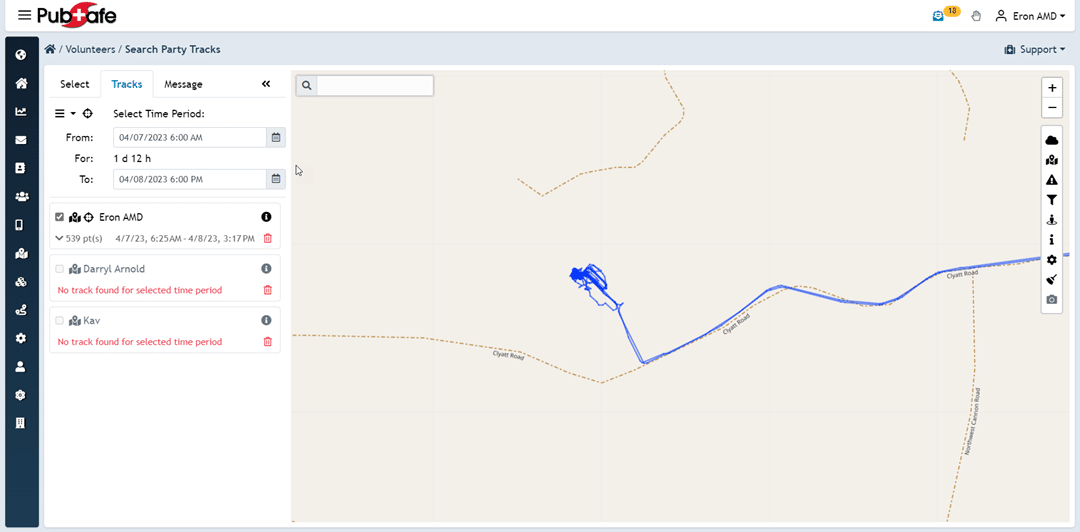
The PubSafe app (SitRep>SAR & NGO) can document information such as evidence found, provide severe weather alerts, and enable routine missing person search operations communication.
Go to our knowledge base to read full instructions on working with missing person search party functionality.
Initial Steps for Finding a Missing Person
When someone you care about goes missing, the feeling of helplessness can be overwhelming. But taking immediate, organized action can make a significant difference. The first few hours are critical, so it’s important to have a clear plan. These initial steps are designed to mobilize resources quickly and efficiently, from alerting law enforcement to activating your personal and community networks. By focusing on these concrete actions, you can channel your energy into a productive search effort and increase the chances of a safe return. Remember, you are not alone, and there are established procedures and community tools to support you through this difficult time.
Report to Police Immediately
Your first and most important step is to contact your local police department without delay. There is a common misconception that you must wait 24 or 48 hours before filing a missing person report, but this is not true, especially if you are concerned for their safety. According to the National Alliance on Mental Illness (NAMI), “If a loved one is missing and you’re worried about their safety, tell your local police right away.” When you call, be prepared to provide a physical description, the clothes they were last seen wearing, their last known location, and any relevant medical information or circumstances. This official report is the catalyst for law enforcement to begin their investigation and get the information into national databases.
Create and Distribute a Flyer
A well-made flyer is a powerful tool for raising public awareness. It should be a clear, one-page document with a recent, high-quality photo of the missing person. NAMI suggests including essential details like their “age, height, weight, hair color, eye color, what clothes they were last seen wearing, and their last known location.” Also, add the police department’s contact information and the case number. Once the flyer is ready, distribute it widely in the last known area and other relevant locations like community centers, hospitals, and shelters. Coordinating volunteers for this task can be streamlined through community response platforms, ensuring you cover as much ground as possible without overlap.
Contact Friends, Family, and Colleagues
Your loved one’s personal network is an invaluable source of information. Reach out to everyone who knows them well—friends, extended family, coworkers, neighbors, and even their doctor. These individuals might have seen or spoken to the person recently and could offer clues about their state of mind, recent activities, or potential destinations. Ask them if they’ve noticed anything unusual or if the person mentioned any specific plans. Create a shared contact list to keep track of who has been contacted and what information they provided. This organized approach helps ensure no one is overlooked and keeps the information flowing to the lead investigators.
Use Social Media Strategically
Social media can amplify your search efforts exponentially, but it needs to be used carefully. Create a dedicated Facebook page or group (e.g., “Find Jane Smith”) to serve as a central hub for information. NAMI recommends you “post pictures, descriptions, and where they like to go.” Share the official police flyer and provide regular, factual updates. Encourage people to share the posts, but ask them to direct any potential sightings or tips directly to the police to avoid misinformation and protect the integrity of the investigation. Using a single, controlled source for online information helps manage the narrative and ensures that all tips are funneled to the proper authorities.
National Resources and Databases
Beyond local efforts, several national organizations and databases are dedicated to helping find missing persons. These resources are designed to connect cases across state lines and provide specialized support for different situations. Tapping into these larger networks can bring fresh eyes and advanced tools to your search. From federal law enforcement agencies to non-profits focused on specific demographics, these systems work in the background to connect the dots. Familiarizing yourself with them can provide both valuable assistance and a sense of hope, knowing that a wider, national effort is underway to bring your loved one home.
National Missing and Unidentified Persons System (NamUs)
The National Missing and Unidentified Persons System, or NamUs, is a critical national resource. It’s a free online system funded by the National Institute of Justice that connects missing persons cases with unidentified human remains cases from across the country. As NAMI explains, this database “helps find missing, unidentified, and unclaimed people across the U.S.” Families, law enforcement, and medical examiners can all enter information into NamUs. This creates a powerful tool for cross-referencing data that might otherwise remain siloed in different jurisdictions, helping to resolve long-term cases and bring closure to families.
FBI and State-Level Databases
The Federal Bureau of Investigation (FBI) plays a significant role in certain missing persons cases, particularly those involving kidnappings or suspicious circumstances. The FBI maintains a section on its website for kidnappings and missing persons, which lists individuals they are actively searching for. When a local police department files a report, the information is often entered into the FBI’s National Crime Information Center (NCIC) database. This makes the case information available to law enforcement agencies nationwide, so if an officer in another state encounters the person, they can be identified as missing.
Resources for Missing Children and Youth
When a child goes missing, specialized resources are available to provide immediate support. The most prominent is the National Center for Missing and Exploited Children (NCMEC). If your child is missing, you should “Call 1-800-843-5678 for help and support,” as recommended by NAMI. NCMEC offers a 24-hour hotline and works directly with families and law enforcement to assist in the search. They provide resources like poster creation, media assistance, and access to a network of experts. Their involvement ensures that every possible avenue is explored and that the search benefits from decades of specialized experience in finding missing children.
Special Considerations for Vulnerable People
Not all missing person cases are the same. Certain individuals, such as adults with mental health conditions or children, are considered especially vulnerable, and their cases require a unique approach. Understanding the specific protocols and legal nuances associated with these situations is crucial for families and search coordinators. These considerations can affect how law enforcement responds, what resources are available, and how the public should be engaged. Being aware of these factors allows you to advocate more effectively for your loved one and ensure they receive the appropriate level of attention and care throughout the search process.
Adults with Mental Health Conditions
When an adult with a mental health condition goes missing, the situation can be complex. While their safety is a top priority, adults have a right to privacy and autonomy. It’s important to understand that police “cannot force an adult with a mental illness to get help or stay somewhere if they haven’t broken the law and aren’t a danger to themselves or others,” according to NAMI. This means that even if the person is found, they may not be compelled to return home. It is vital to provide law enforcement with as much information as possible about their condition, potential triggers, and any medications they may need to help officers understand the urgency and handle the situation with appropriate care.
Missing Children and Young Adults (Under 21)
The response to a missing child is swift and governed by strict federal laws. Unlike cases involving adults, police cannot delay taking a report for a missing child. NAMI clarifies that law enforcement “must add the child’s information to the FBI’s national system within two hours.” This immediate action triggers a multi-agency response that can include AMBER Alerts if the case meets specific criteria. For parents and guardians, this means you should expect an urgent and serious response from the moment you make the call. The protocols are designed to mobilize every available resource as quickly as possible because time is the most critical factor in ensuring a child’s safe recovery.
Important Safety Protocols
As the search for a missing person gets underway, community members and volunteers often become the eyes and ears on the ground. While this collective effort is powerful, it’s essential that everyone involved follows strict safety protocols. The goal is to find the missing person and ensure their safety, as well as the safety of everyone participating in the search. Using a coordination tool like the PubSafe app can help a search manager keep track of volunteer locations and ensure everyone stays safe and accounted for. Following established procedures ensures that the situation is handled by trained professionals, preventing any actions that could inadvertently cause harm or complicate the official investigation.
What to Do if You Find a Missing Person
If you believe you have found a missing person, your personal safety and the safety of the individual are the top priorities. The California Department of Justice gives clear guidance: “Do NOT take action yourself. Instead, contact the police department listed in their record.” Do not approach, follow, or attempt to restrain the person, as you don’t know their state of mind or how they might react. Instead, move to a safe distance, keep them in your line of sight if possible, and call 911 immediately. Provide the dispatcher with your exact location and a description of the person and their behavior. This allows trained officers to respond appropriately and safely.
Coordinate Your Missing Person Search
- Last known location
- Route history
- Chat/messaging
- Marking evidence location
- Request help
- Review map for missed search areas
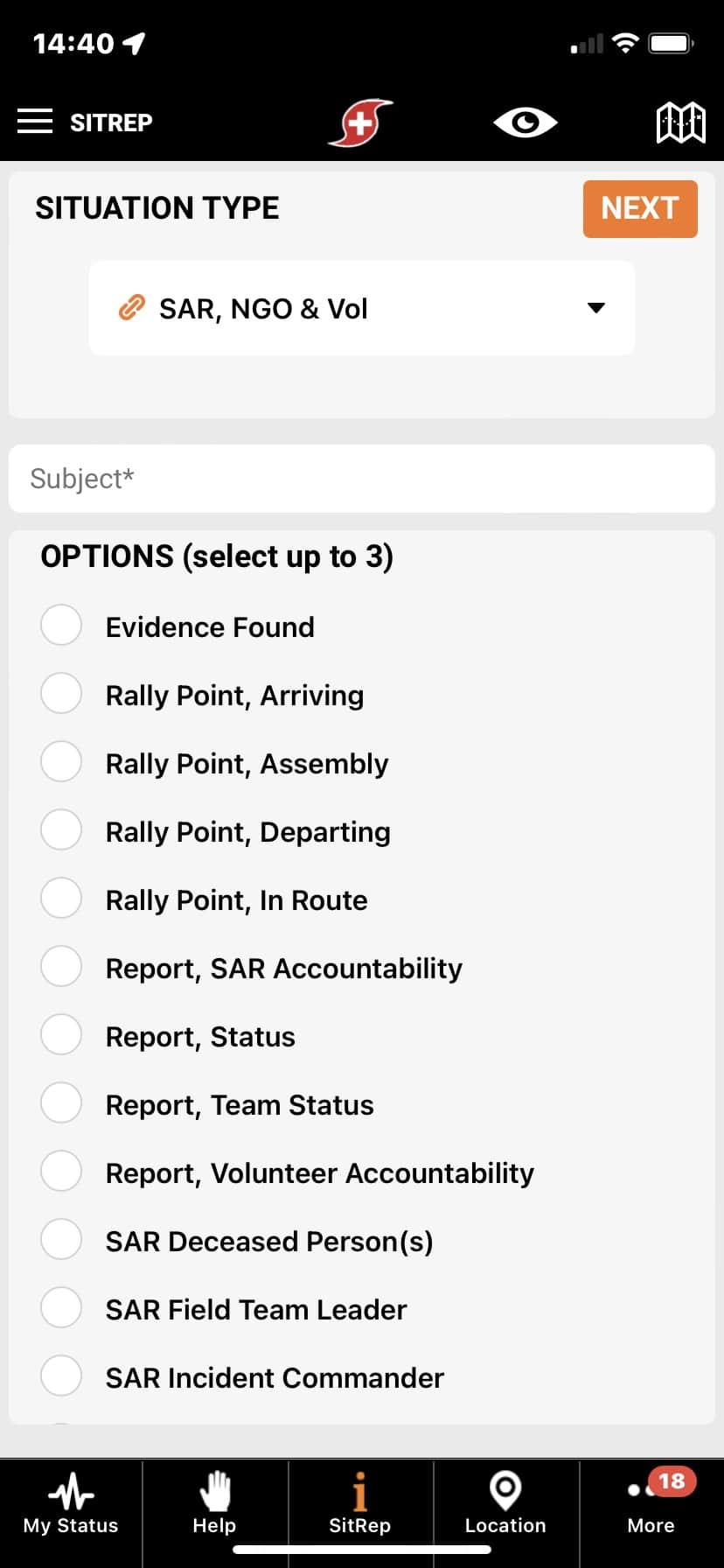

Easily Add and Manage Search Volunteers
If more efficiency is needed for volunteer tracking and communication, the managing organization can send a link or provide a QR code to link “civilian” volunteers to the organization for a specified period of time. Volunteers will need to upgrade from the free PubSafe version to PubSafe Pro. Volunteers can use a link or scan a QR code which connects them to a specific search party created by an organization using the PubSafe web portal. The incident commander can now track organization members as well as impromptu volunteers. The search party chat function enables search party wide communication and messaging for org members and volunteers. Communication such as starting or ending the search, advising of foul weather, and other safety and coordination information to all participants.
Create a Search Party
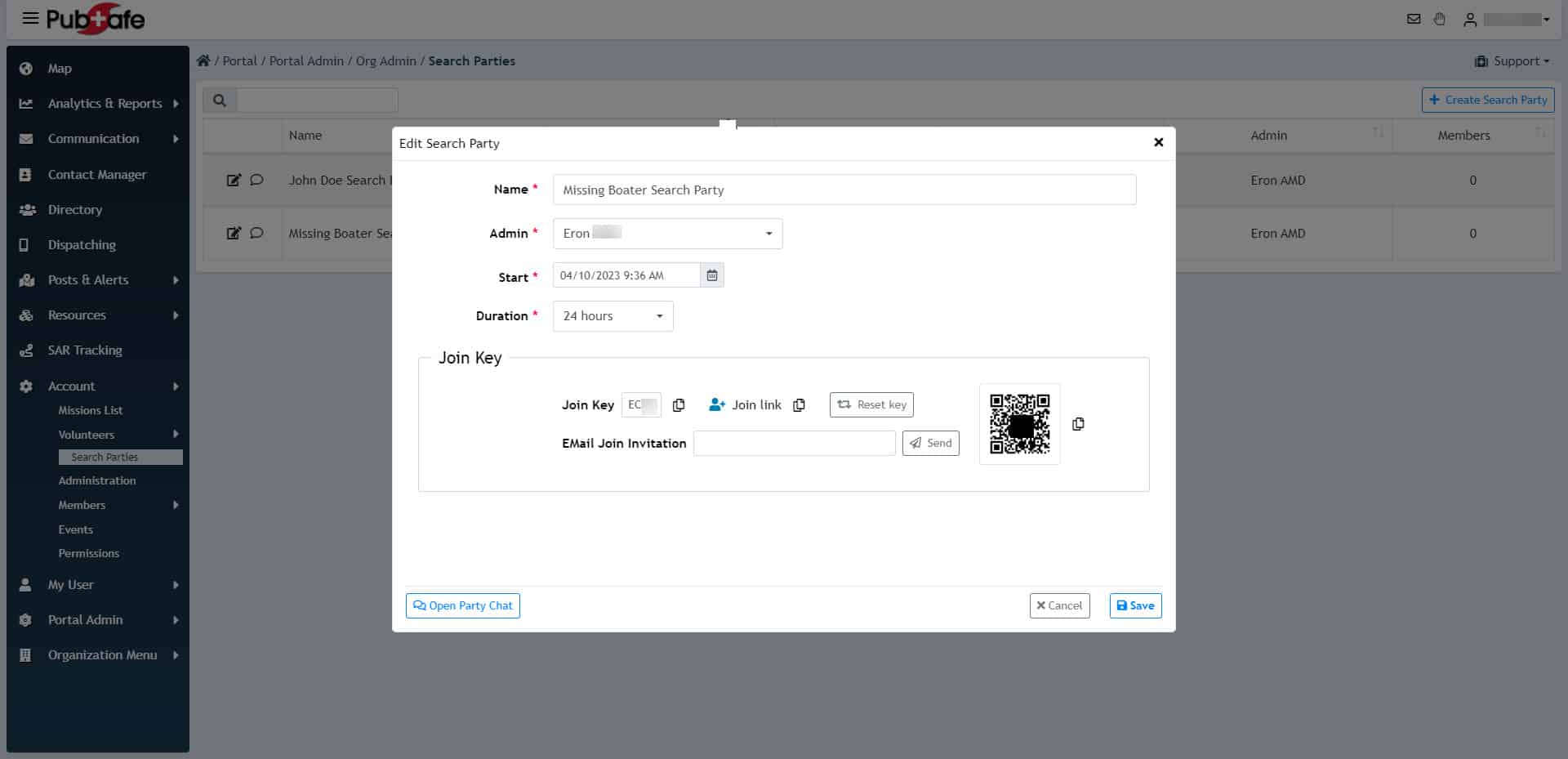
Track Your Team in Real-Time
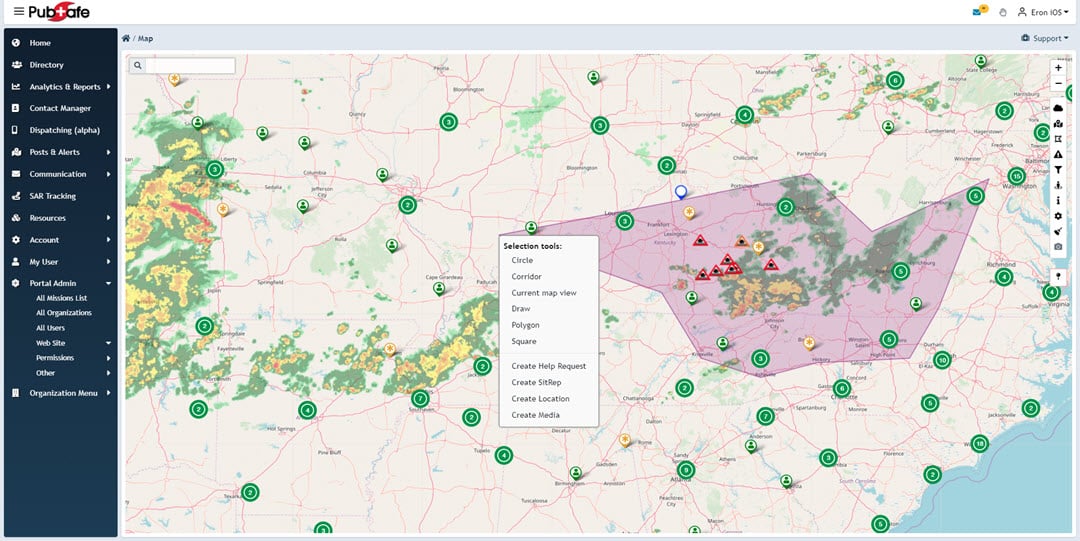
The web portal is designed for dispatchers and support personnel to monitor and advise the incident command and leadership during a disaster or missing person operation. The portal offers a large map that can be filtered in many ways to display just the data the dispatcher needs to see. Posts made to the mobile app are visible on the web portal map. Dispatchers can then dispatch organization members, in a responder role and mission ready to a point on the ground.
Missing Person Search Process Using PubSafe
When conducting a missing person search, technology like that of the PubSafe publisc safety and communication platform can improve efficiency, reduce cost, and save lives.
View Transcript
…This video we’re going to be talking about how the PubSafe platform. Can be used during missing person search operations. The primary benefit that you’re going to receive from using the PubSafe app, as well as the portal is the visibility over the location of all the users. and participants in that process. And typically in these types of situations you have an organized organization such as NGOs that’re going to participate You may have law enforcement that’s going to participate.
And then you’re going to have people that just show up. And the people that just show up are everyday citizens that may not have any training whatsoever, but are invaluable to the process. you know law enforcement government agencies and even NGOs can’t cover all the territory that needs to be covered in a lot of rural missing persons situations. In fact here in the Florida area. We had a volunteer actually find a missing toddler.
in 2023. after law enforcement and other agencies had done their searches with their dogs and everything else. the sheer number of people was able to expand the search area Search in greater detail was able to locate the child safely.
who was safe after being in the woods for 24 hours. So you know the big question is how do we manage this process And. in the search that. I witnessed. What I saw was a very good effort.
But it was very. basic and rudimentary and there was room for improvement for increased organization. And you know, there was no visibility over. Where people were. For their own safety.
for the efficiency of the search effort. And there was no way to review where they had traveled. So you could not look back and see if someone had missed a particular area. There was an effort to get people to install a phone tracking app. Which would re log the information to the phone.
And then that information was supposed to be emailed to a central point or point of contact wjo was then going to somehow consolidate all that information. To look at the track history. So a wildly inefficient process. and that really caught my eye.
The second thing I noticed was you know the sheriff was trying to talk to about 150 people at once. He had no megaphone. He was not on a perch, so his voice could not carry over the crowd. And the people that could hear them were really just the people in the first row.
It was at a gas station on the corner and there were cars going by and people were coming and going.
while he was trying to talk So he quickly figured out you can’t talk to the little croutons It’s not going to be conducive to people going to. to hear you. So we started working with. you know teams of you know five to 10 people. And he would talk to those people and assign those people out.
And he was doing it from memory because he knew the area. but oftentimes. A year. You know just out of being human you might miss an area. Number two is, you know you can only talk to one team at a time so you’re not.
Really pushing everybody out as quickly as possible to these different areas. And then you’re not able to see who’s You know who got to their areas when they got there and what you know what ground they covered. And then you know if a search wants to go on for multiple days you would have to kind of repeat this process every day to try to. You know coordinate people probably at the end of the day to gather information And then also the first thing the next morning to. But the cruise back out.
To where they,
where you think they need to search on day two…
At the same time, you’re trying to manage. canines horses ATVs. People. Law enforcement from other areas. NGOs with more experience and things of that nature So it’s a very…dynamic and chaotic situation.
And…
You know certain. Agencies are going to do better at that because they practice or they have more you know people that go lost in their area for whatever particular reason maybe they’re. out west and I’ve got a lot of recreation areas so they’re going to be more proficient in this entire process. But, you know pub safe brings to the table the ability to see. People in the area first and foremost.
Where are people walking during the searches. And you know PubSafeis dependent upon having an internet connection so, you know there are going to be times when it’s not a good tool. And not every tool is a good tool all the time. But in a lot of cases where cellular coverage is available. Somebody with the incident command center is going to be able to
It’s going to be able to use a computer and see where everybody is And ideally you have maybe a laptop. with a wireless card or you have somebody back at an office with a high-speed internet connection that has multiple monitors that has a couple of different maps up. And from there they can monitor directly. People through the different aspects of sharing information.
Guiding people. finding people chatting with people messaging. you know, People that are on the platform. If somebody identifies evidence they can work on dispatching somebody over to take a look at that evidence, things of that nature So there’s a lot that somebody in the background can be done. That is not in the field.
And we highly recommend that there be a person or two. maybe even three in that capacity to depending on the number of people that are out there. And then you really need to have organizers that are onsite, you know people that are that administrative support mechanism that are going to answer questions They’re going to follow up on things, you know somebody’s oh my. We forgot to sign or we forgot a QR code or we forgot to banner or we forgot. You know wristbands or something of that nature.
You need people to go take care of that…
The incident commander can not be the person that’s running that stuff down So. what you’re seeing is the formation of this team that gets preassembled. They understand their roles and responsibilities they know what to bring where to bring it and how to set it up and how to support the people that are going to be interacting with and managing and leading the the actual search teams Because ultimately everything that happens is about. The search teams. Accomplishing their mission which is to find the missing person.
Right So, this type of stuff really has to be. up in advance and coordinated in advance So let’s take a look at the pub safe platform. And talk about, you know the different ways that it can be used to assist in these different scenarios. as you can see on the screen. You know kinda flipping through some different things So you can get an idea of some of the different views that are available, in the web portal.
And there are actually two parts to the pub safe platform First is the, mobile app The mobile app is which creates visibility and there’s different versions of the mobile app There is a free version which everybody that shows up can get the free version of the mobile app, which is going to enable someone using the web portal to see everybody’s location. Now you can’t. use all the tools to communicate with people that are using their free version. if you have a government account you actually could write we don’t allow NGOs and other in private entities to communicate with every city. user of the pub safe platform.
But a government entity…
That has an organization registered on the public platform. We’ll be able to communicate with every citizen that is out there And when we say communicate what that means is drawing a circle on the map or selecting every user that is in the map view. And. Being able to send them messages. Right So if you want to circle everybody that’s at the search party.
initial rally point you can do that. And then and then as you see here, you can grab people within this polygon and then you have the option of sending them a message. So you can mass message, everybody. you can mass you can message hundreds of people thousands of people at a single time. Or you can get very specific with people in messaging One to five people based on different things in this example you might message these people because of the severe weather that is coming through their particular area.
Okay. So that is a government. Access. benefit…and, If you’re with an NGO and you’re out doing a search you will be able to message
people that are not part of your organization, but you will be able to chat with individual users One-on-one. So there is that way of communicating. you can as an NGO mass message all of your members and in order to join an NGO. Pope safe. Users have to upgrade the mobile app to the pro level.
And once you do that then they become visible inside of your pub safe, a portal online. on the home screen that you can see here we can see all users in the area that are active or have left their visibility status to visible. users can go invisible. and you could have 20,000 people on this map and you just wouldn’t see them because they chose not to be visible. The users, visibility and privacy settings override all other settings in the platform, right That’s the number one priority.
But if you have a member that wants to share their location with you which they typically do because they’re part of a, an effort. Then he would be able to see them on the map and you can message people. You can view some of their you know you can view labels of people. So when you zoom in you can start looking at people’s names and things like that And you can understand who’s where. And who they are.
Right. And you can filter the map So Hey look I don’t want to look at. Everybody I just need to know where my organization members are So it’s simply just de-select and then go back in and check on members only and then apply changes. And you can see we have a small group of members in this particular organization. Which is just an internal demo organization.
So if I uncheck that like actually go select all. And then apply again and I bring all the users back. So if I’m conducting search operations in this particular area, I could zoom in on these people. And I could see all right we’ve got these users that are working in this area these users that are over here, but typically what you’re going to have is a user out in the more rural area. For these types of searches.
So you would see a cluster of people you know maybe you’re seeing 20, 30, 40 a hundred 300 people in this in a small geographic area. And then.
from there, you can start to identify what. areas are actually being searched. And you know with that you can then say okay it looks like we don’t have any teams over in this area. Let’s go ahead and send somebody over to, you know let’s let’s send somebody over here to search in between the lake and the swamp. Right And then you see people move down the map and then you see them show up in there and then you know all right We’re operating in that area.
When you have a situation where you have members that are, actual members of your organization who have to be invited. Just so you know and the invite processes you go to the account you go to members and you can go down to the join section. And at the top of this screen is you’ve got four options for sending. Invitations out to people. And, You know the idea is not to try to do this the day before you have a mission.
What you want to do is do this week before So everybody gets a chance to use the platform and play with it.
test it. Get…used to the flows back and forth…
And then go to the field and focus on the search. With the technology supporting the effort in the background. the QR code can be sent It can be shared over a text message which is great. but everybody has to get the pub safe mobile app first. and you installed the free version.
And if you’re going to join an organization and you upgrade to the pro version, and then you apply a link through the mobile app itself. Okay So, once you accept an invitation from an organization you end up back into in this view and then the user. the admin in the portal has to then edit and then change the state to approve before you’re actually a member of the organization. So it’s a three-step process I invite you you accept And then I do final approval. Okay That’s all for security.
for various reasons. Now. When we, talk about members of an organization, This is where you can actually track. The history or the, the route activity of a member.
Going back up to 96 hours. And again if you,
if you do not have, or if that member chooses not to share that visibility, You don’t get to see anything. Okay That’s just the way it works. So when a track is first drawn, We draw it very generally Right You’re seeing a very. Vague description. We do that because if you had 300 people in an area and you tried to pull the detailed track data on 300 people, Then you’d be sitting there for awhile It’s just the nature of the internet and the speed of things.
And you know it depends on your connection speed and what have you. You can then go to the left-hand side and you can modify the resolution. By changing some of these variables depending on how long you want to wait and how detailed you want to get. And you see it starts to add more data points. So we can simply uncheck this box and hit apply.
And now we have a very detailed track, which if you think about what this looks like if you had 20 people searching this area, You would very clearly be able to see whether or not somebody searched this lower right quadrant Right. Did they go around the room? or did they actually go through the vegetation in this area? And if that happens then you would be able to send somebody back to actually search an area that was missed. And that’s why joining an organization brings a lot of value to how the Pope safe platform can be used.
When you’re looking at the
the map itself. and you wanted to, let’s say somebody found a piece of. An article of clothing could be potentially evidence, right? In the mobile app they would go create a sit rep And in that sit rep there is a. an option for Charlotte And NGO operations down towards the bottom…
And they would simply select that option And then a list comes up of sarin NGO related. Topics that they can select. From and one of those is potential evidence. So when that potential evidence is selected and saved then it ends up on the map And then, A dispatcher from the computer would then be able to go in here and take a look You can also filter this on the on the mobile app as well, but if I do select it all and then I came back and I looked on situation look for situation reports and hit apply changes. nothing in this particular area Matter of fact we don’t have an example on here, but it would show on the map and you would be able to, see where that person, that member had marked the map.
indicating that there was evidence there and then you would be able to dispatch somebody to that particular location. Which is a function of dispatching right? So only members can be dispatched. And members must be in a responder role right? Because you can toggle back and forth between being a citizen and responder.
And by being in citizen status you’re saying Hey I’m not in a. In a position to be able to help. When you switch over to responder you’re saying Hey look at me. I’m avail. I have something to offer I’ve got skills resources or I’m a volunteer or,
I I’m ready to go do something right. So you can see we’ve got a couple of different options up here. And things that come in. like my post So if you were dispatching to one of your posts, post is you know the sit rep that was putting them out and you could select it from here and then push it out to, one of the members of your organization through the pub safe mobile app. And they have to accept that mission.
And then it comes back So there’s this whole process of of dispatching that, it’s controlled. It’s a logical. It’s efficient. And it doesn’t take…a lot of calling back and forth to get information to people. Which saves a lot of time and it increases the volume.
of help request that can be pushed to the field. If someone. Has an issue…
Okay So I just created a set rap and posted it and wanted to show you what it looks like on the map. So you can zoom in on that now and you can see…
The information that’s tied to a situation report So evidence found blue shoe size seven. This is a unique reference ID. It was created 42 seconds ago It’s going to expire in 30 minutes which is something that I set just to take it off the map These are the GPS coordinates If you want to copy that and send it via text message or something of that nature, and you can zoom straight to that and sit up on the map. And this is my information on. Me because I’m the one that actually created it.
I as the creator can actually believe a situation where I can flag it as well as inappropriate. And then moderators would be able to take a look at that. So, that’s what a sit rep looks like when it gets to the map…
So with that information hopefully it starts to give you an idea of how pub safe can be utilized for. missing person search and rescue operations. We have integrated with the Geotab telematics platform to to bring over that information which is vehicle tracking. we have the potential to bring in data from other data sources such as portable GPS tracking devices that may go on canines or. Horses or something you know that may be separate You know horses obviously aren’t separated but go on canines that may be separated from their handlers somehow.
you know things of that nature So if you have a need for that specifically like a government agency, then we’d be interested in talking to you you know once you’re on the platform and. I get to get to see how things work. And then. Look at doing some integrations from there. So thank you for your time and interest to this point.
And if you have questions…
If you have questions or would like a demo of the Pope safe platform or just want to register for the. 90 day trial please visit our website. And go to the joint menu and you can submit an org application. And this does take a little bit We don’t allow anybody without any kind of background or history to just join and create an organization. there’s a vetting process for that.
And then if you want to install the pub safe mobile app, then you can do it here Or you can link straight to the stores. you can’t install it from our website You actually have to link and go straight to the stores. And we have links for you or you can scan the QR codes and go to the respective stores. So the first step in this process is getting the free version of the pub safe app. We encourage you to play with the free version for a while And then if you’re interested in moving on then create the organization and then work through the joint process and visit our blog Page two we just published a detailed description of how to join members to an organization.
That’ll give you a feel for that process And once you understand the process, You know it’ll it’ll click right along. Thank you very much And,
we look forward to seeing you on the pub safe platform.
Frequently Asked Questions
How does PubSafe actually help coordinate volunteers on the ground? Think of PubSafe as the digital command center for your search. Instead of relying on group texts and phone calls, everyone in the search party appears on a single, live map. This allows the search manager to see where everyone is in real-time, send messages to the entire group or specific teams, and direct people to new areas without confusion. It turns a scattered group of well-intentioned people into a coordinated and efficient team.
Do all my search volunteers need to pay for the Pro version of the app? No, not everyone needs the paid version. Civilian volunteers can download and use the free PubSafe app, which allows the incident commander to see their location on the main map. For more advanced features, like seeing a volunteer’s route history or including them in specific group chats, the Pro version is needed. An organization can provide temporary Pro access to volunteers for the duration of the search, making it easy to bring everyone into the fold.
Can I see where my teams have already searched to avoid covering the same ground twice? Yes, and this is one of the most powerful features for a search manager. For members with the Pro version, the platform can display their track history. This creates a visual record on the map of the paths they’ve walked, so you can instantly see which zones have been thoroughly covered and identify any gaps. This prevents wasted time and ensures your search is as comprehensive as possible.
If a volunteer finds a potential clue, how can they report it without causing chaos? Instead of calling a busy command post or starting a confusing chain of messages, a volunteer can use the app to drop a pin right on the map at the clue’s location. They can add a note describing what they found, like an article of clothing. This report appears instantly in the web portal, allowing the search manager to see the information and dispatch a law enforcement officer or team leader to the exact spot to investigate properly.
Can I use PubSafe to organize a search with friends and neighbors, or is it only for official organizations? While PubSafe is built for professional organizations like NGOs and CERT teams, it is also designed to incorporate community-led efforts. An organization managing a search can easily generate a link or QR code to bring impromptu volunteers (like friends and neighbors) into their temporary search party. This gives a community the ability to organize effectively while still operating under a clear and safe command structure.
Key Takeaways
- Take Immediate, Organized Action: Your first steps are critical, so report the person missing to the police without delay, distribute a clear flyer, contact their personal network, and use social media to share official updates from a single source.
- Coordinate Your Team with a Central Hub: Disjointed efforts waste precious time, so use a platform like PubSafe to see every volunteer on a live map, mark evidence locations, and communicate with the entire team at once, ensuring no area is missed.
- Prioritize Safety for Everyone Involved: A successful search is a safe one, so make sure all volunteers understand the protocol, especially for vulnerable individuals. If you locate the missing person, your first action should always be to call 911 and wait for trained professionals.


