
When you hear the phrase “satellite tools,” what comes to mind? For most, it’s a rugged satellite phone or a personal locator beacon used by hikers. While those are crucial pieces of the puzzle, the reality is much broader and more powerful, especially for emergency response. The term also covers the sophisticated software that turns raw satellite data into a clear map of a wildfire’s path, the physical hardware needed to set up a command post’s internet connection when all other networks are down, and even the manufacturing processes that build the satellites themselves. Understanding this complete ecosystem is vital for effective disaster coordination.
What Are “Satellite Tools”? A Guide to the Different Types
When you hear the term “satellite tools,” your mind probably jumps to personal locator beacons or the satellite phone in a disaster movie. And you’re not wrong! Those are definitely part of the picture. But the world of satellite tools is much bigger and more varied. It includes everything from sophisticated software that analyzes global weather patterns to the physical nuts and bolts used to install a communication dish. For anyone involved in emergency response, understanding this full spectrum is key. These tools don’t just help you find your way; they provide the data, communication, and infrastructure needed to manage a crisis effectively from start to finish.
Beyond Personal Locators
While personal devices like GPS units and satellite phones are vital for on-the-ground communication and navigation, they are just the tip of the iceberg. The term “satellite tools” also encompasses a vast array of software, hardware, and even manufacturing processes. Think about the software that interprets satellite images to track a wildfire’s path, or the specialized physical tools required to set up a satellite internet connection at a remote command post. It even includes the high-precision manufacturing needed to build the satellites themselves. This broader view reveals a powerful ecosystem of technology that supports everything from large-scale data analysis to establishing critical communication links when other networks fail.
Software for Analyzing Satellite Data
Satellites are constantly gathering a staggering amount of raw data, but that data is only useful if we can understand it. That’s where specialized software comes in. These programs act as translators, turning streams of numbers and complex imagery into actionable intelligence. For emergency response teams, this is a game-changer. This software can create maps of flooded areas, predict a hurricane’s intensity, or monitor air quality after a volcanic eruption. The real power is unlocked when this information is fed into a central platform, allowing different teams and organizations to work from the same playbook and coordinate their efforts in real time.
NASA’s Earthdata Project
You don’t need a massive budget to access powerful satellite data tools. NASA, through its Earthdata project, provides a huge collection of resources designed to help the public, scientists, and organizations use Earth science data. They offer a wide range of online tools for various tasks, from visualizing atmospheric data to tracking changes in land use over time. This initiative makes decades of scientific research and satellite monitoring accessible to everyone. For organizations involved in disaster preparedness and environmental monitoring, this is an invaluable public resource for understanding long-term trends and responding to immediate events with scientifically-backed information.
Key Software Tools for Data Analysis
Within NASA’s offerings, a few tools are particularly useful. The Worldview interactive interface, for example, lets you browse and look at over 1,200 full-picture satellite images from around the globe, often within hours of them being captured. You can layer different data sets to see, for instance, where a dust storm is overlapping with population centers. Another critical tool is FIRMS (Fire Information for Resource Management System), which provides near real-time data on active fires. This allows firefighters and emergency managers to see exactly where a wildfire is spreading, helping them make crucial decisions about evacuations and resource allocation.
How Satellite Data Aids Emergency Response
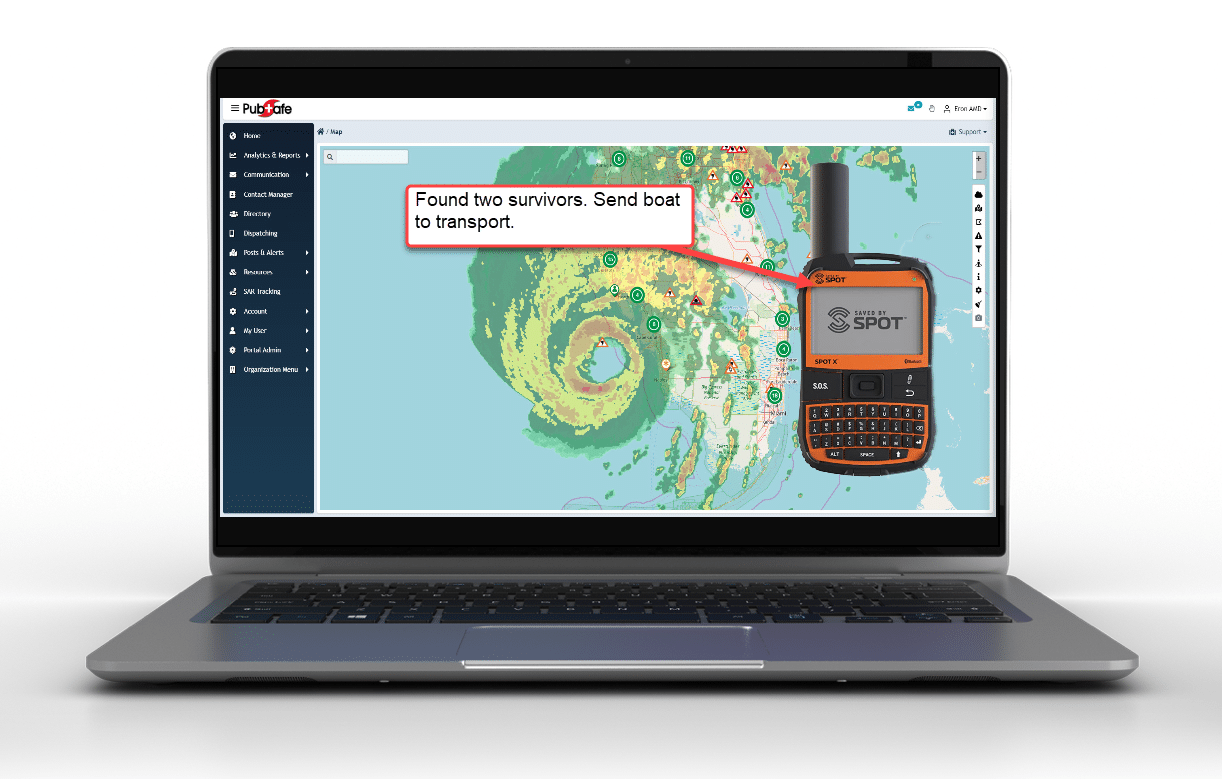
For organizations involved in disaster response, access to real-time, large-scale data is critical. Information from tools like NASA’s Fire Information for Resource Management System (FIRMS), which maps active wildfires, can be invaluable. When this data is integrated into a shared platform like PubSafe, it allows everyone from government agencies to citizen volunteers to see the same picture of an evolving situation. This shared awareness helps teams coordinate more effectively, deploy resources like volunteers and equipment where they’re needed most, and keep the public informed through tools like a public-facing map.
Physical Tools for Satellite System Installation
Shifting from the digital to the physical, let’s talk about the hands-on tools needed to make satellite systems work. Before you can analyze any data, you need a reliable connection, and that often means installing hardware. This could involve setting up a satellite dish for internet at a temporary shelter or mounting an antenna on a vehicle to create a mobile command center. In a disaster scenario where terrestrial infrastructure like cell towers and fiber optic cables might be damaged or overloaded, the ability to quickly deploy your own satellite communication link is absolutely essential. These physical tools are the foundation of a resilient communication strategy.
Essential Tools for Setup
Setting up satellite equipment requires a specific set of tools. You’re not going to properly install a satellite dish with just a standard wrench and some duct tape. Professional installers use a kit that includes items like cable strippers, crimpers for coaxial connectors, and compression tools to ensure weatherproof seals. They also use signal strength meters to precisely align the dish with the satellite. Brands like Jonard and Klein Tools are common in the industry, and you can find a wide variety of these satellite installation tools from specialized suppliers. Having the right tool for the job ensures a stable, reliable connection when you need it most.
Common Brands and Costs
If you’re building a communications kit for your organization or CERT team, you might be worried about the cost. While highly specialized diagnostic equipment can be expensive, many of the essential hand tools are surprisingly affordable. Based on listings from satellite equipment suppliers, the prices for many fundamental tools, like cable cutters and crimpers, generally range from about $10 to $75. This makes it feasible for even volunteer teams with limited budgets to assemble a basic installation and repair kit, ensuring they have the capability to establish their own communication lines in the field.
Manufacturing for the Satellite Industry
Let’s zoom out to the biggest picture. The ultimate “satellite tools” are the satellites themselves, orbiting thousands of miles above us. Creating these incredibly complex machines is a monumental task that relies on a specialized and highly advanced manufacturing industry. Every single component, from the solar panels to the tiniest microchip, must be engineered to perfection to withstand the vacuum of space, extreme temperature fluctuations, and intense radiation. This industry is the silent partner in every piece of satellite data we use, providing the foundational hardware that makes everything else possible.
Precision Machining Services
At the heart of satellite manufacturing is the work of companies that provide precision machining. Firms like Satellite Tool & Machine use advanced computer-controlled equipment to craft intricate parts from exotic metals and alloys. They offer services like large precision machining, turning, and milling, which are essentially highly sophisticated methods of cutting and shaping materials to exact specifications, often with tolerances smaller than the width of a human hair. The incredible reliability we expect from our satellite networks—whether for GPS, weather forecasting, or emergency communications—is built upon this foundation of meticulous, high-precision manufacturing.
How to Choose the Right Satellite Locator
After every hurricane NGOs and responders of all types ask what to do about communication when the cell towers are not working. Most societies have become dependent on cellular communication for basic operational needs. Personally, it may be to find a place to stay if a home is destroyed. Professionally, it is to coordinate rescue, logistics, and communication when radios are not compatible or out of range. For NGOs the problem is a bit different since most are underfunded and the average volunteer may struggle with new technology. In comes satellite locators.
Staying Connected When the Grid Goes Down
Immediately following a major hurricane, cell phone service is often limited. Towers may be out of operation or the traffic may be so high you cannot communicate. It certainly doesn’t help to have everyone uploading videos and live streaming when rescues are still underway.
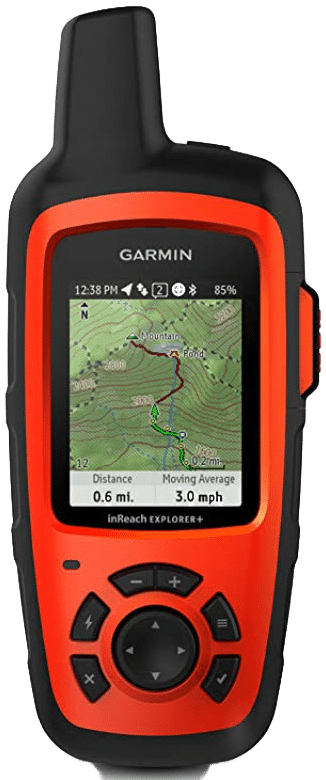
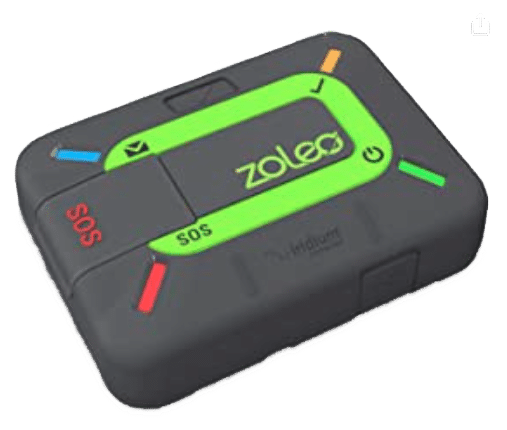
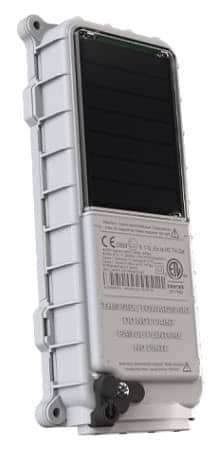
PubSafe evaluated three satellite locators and communicators. Each having a similar feature set and location is the most basic function. Knowing a persons location is needed to aid in rescue but also to know where people are so they can be dispatched to assistance missions.
Dispatchers in other states or countries need location information and then a way to send mission details to search and rescue teams. Historically, satellite locators and communication has been expensive but prices are slowly coming down. You can often get service for a short period of time and then put the service in “suspend mode” until needed again.
How Satellite Locators and Networks Work Together
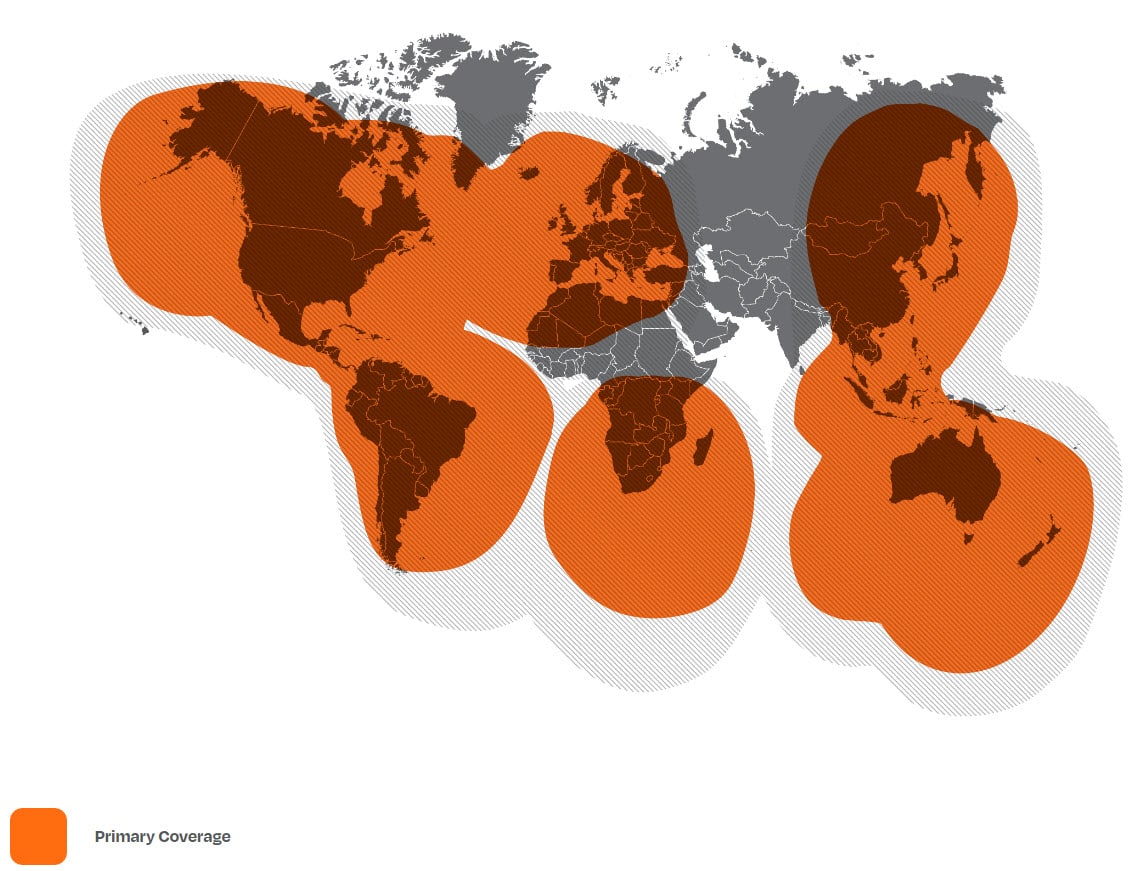
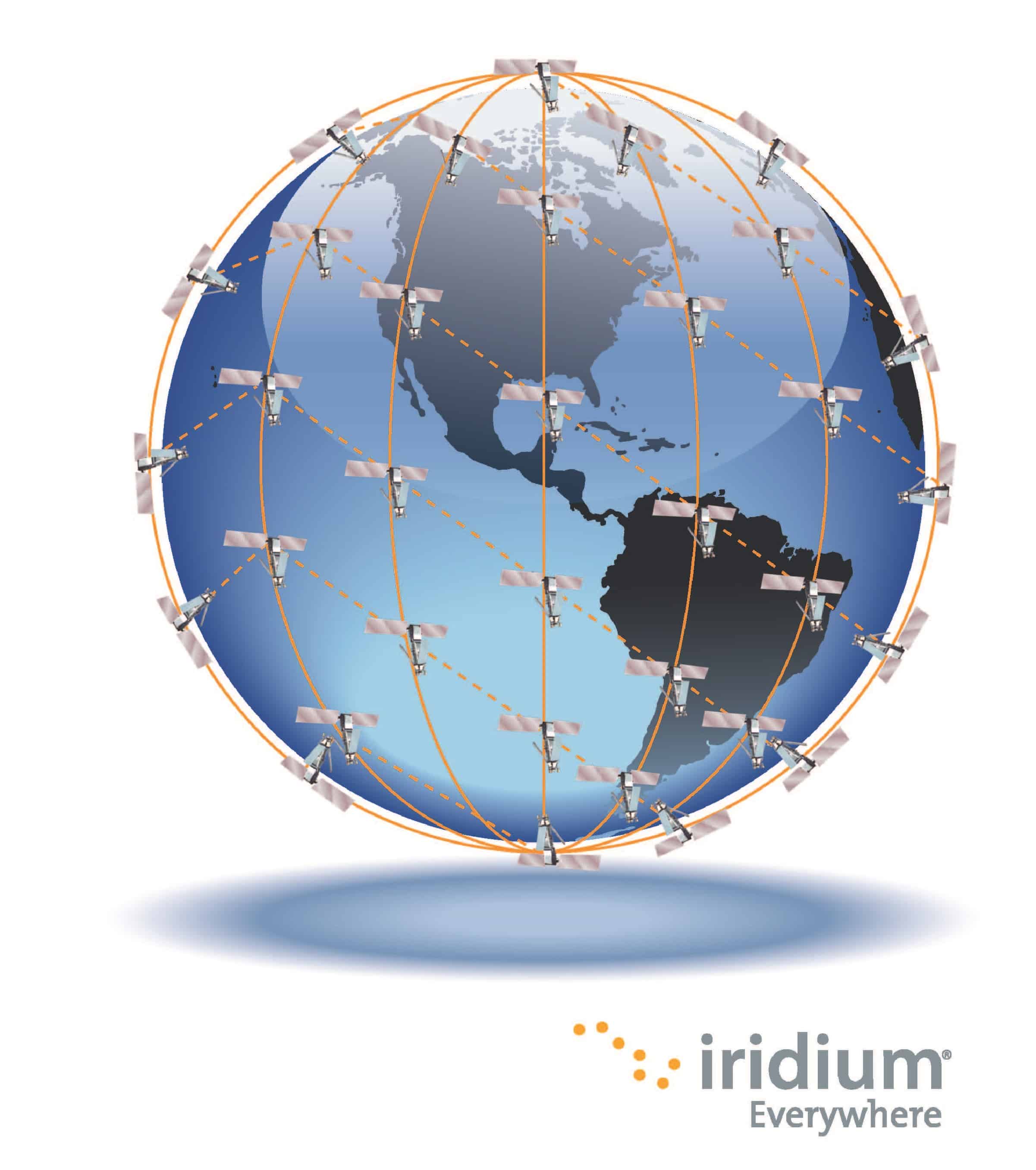
There are two primarily two satellite networks available to consumers, GlobalStar and Iridium. These are also used by the US government but not likely on the same “channels” for security and reliability. The networks very in how they communicate and the coverage area available.
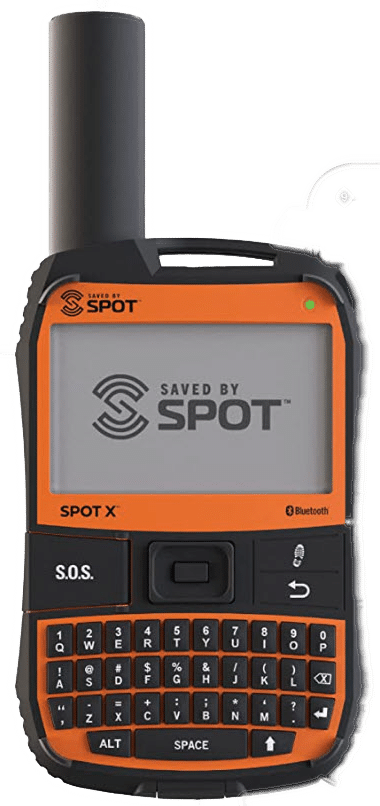
GlobalStar offers the SPOT device. It is a favorite because of the full size keyboard. To 99% of users the GlobalStar network is going to work well. However, when you are not in the coverage footprint, it is a complete no-go.
Garmin InReach and Zoleo utilize the Iridium constellation. Iridium offers better global coverage than GlobalStar but tends to run a little more expensive. Watch the video above for more details.
For search and rescue PubSafe would choose the SPOT or InReach. Zoleo’s mobile app and web app are not on par. Garmin and GlobalStar have been around for decades and offer a predictable service with a proven track record. Zoleo is an up and comer but until the provide easy forms of integration, it is a product for backpackers.
Video Transcript
Read the Satellite Locator Video Transcript
…Hey everybody Eron from PubSafe today was going to talk about a couple of different types of satellite trackers EPRBs. If you will communicators of different types and talk a little bit about you know what goes into these and how are these pertinent to search and rescue We all know that anytime that there’s a major disaster cell phone communication goes down for at least a couple of days. And we have to try to figure out how do we communicate during that time period.
So what makes you know perhaps this unit better than this unit or different from you know this unit So I wanted to run through a couple of things that you may not know about these things I’m not going to get into technical specifications You can go online and read those. specific things, but I have used all of these devices and I have some opinions that…may provide a little bit of insight to help you and your team choose. Which one of these three devices or perhaps none of these devices are going to be the right fit for you So you may want to go out and look for something else, but let me start with talking about how these things communicate And once you understand that then you can kind of start to frame.
a decision on what’s going to work best for you. you know first of all any GPS device is is nothing but a receiver You know the GPS satellites are in the sky and they’re transmitting a beam. And if you think about like an FM radio station that you the radio in your car is a receiver and. FM radio station is beaming signals that your antenna in the vehicle picks up. Well that’s the same with GPS satellites They are beaming signals.
To a receiver. And when you get signals from multiple satellites then you’re able to triangulate to where the, you know the device is able to triangulate. The position of the device on the earth right? So you have to have at least three satellites and the more satellites the more accurate that you can get, the most of these devices will be accurate down to somewhere between one and. About 10 meters which is you know more than enough for, you know the type of search and rescue applications that we’re talking about.
Number two is you have to try to decide what you want to do. with the device
do you want to be able to send a lot of short messages? So something like this with this type of keyboard is going to be a lot easier than something with, no keyboard which means you have to you know do the old scroll up hit twice. You know there’s select different letters and numbers and things like that So it takes a lot longer to send messages off this. Almost all of these devices offer pre-configured messaging which is great. It shortens the texting you know the message creation time.
I can somewhat manage the data things of that nature. And you know with these two devices those messages are programmed onto or transferred onto the devices. Because these are standalone devices right There’s no mobile app necessarily but you do have to get the messages on there. Prior to going to the field. this device here app we’ll connect via Bluetooth to a mobile phone If you have the app and you can do some things back and forth that way, in addition to having a full functioning keyboard and other features So, you know this one gives you a lot of flexibility This one you have to hook to the computer before going out
I’m sure there are models where there’s Bluetooth and it connects to an app as well that you can transfer things but yeah that’s a bit of a process and then you have. You know this particular vice. for…which can operate standalone but you can see there’s no keyboard on it So if you want to do messaging you really have to have the mobile app on your mobile phone. And there are some pros and cons. To this device configuration as well.
But before we get into that let’s talk about how these devices communicate and what happens is they get information from the GPS satellites. And then if you want to send information to someplace else, You want to share your position with. Somebody through a map sharing link which all of these devices offer, or you want to send a message back Then you have to transmit from the device up to a satellite, which then routes the information back down to a dish And then that routes it to. you know a location online that becomes accessible or forwards an EA. or whatever Basically it goes from the satellite to a dish to the manufacturer based on the IME number of the device.
And then the manufacturer does whatever your account is set up to do I E maps share forward to SMS messaging or things of that nature for emergency contacts et cetera et cetera So.
The satellite communication piece is really important to understand First of all, I have seen in a medical emergency situation where somebody stood on it. Out in an open field in Colorado and had a sat phone and tried to make a phone call and it did not go through, right It just wouldn’t work. So you know the idea that you are 100% going to have communication is not true Right? Satellite communication is very sensitive to a line of sight. So where you can take your cell phone and you can talk inside your house.
because at towers you know maybe a mile two miles five miles away, you are not going to talk inside your house using a satellite telephone You have to have a direct line of sight to the sky. And when you are in vegetation that’s a problem. pine trees with the pine SAP and there are more restrictive than other types of, you know thin leaf materials that don’t have a lot of SAP. So there are. A variety of options that you can choose from.
but there are a lot of things that you need to understand about satellite communication.
Frequently Asked Questions
“Satellite tools” sounds complicated. What do I really need to know as a first responder or volunteer? Think of it in two simple parts. First, there are the personal devices, like a satellite locator or phone, that keep you connected when cell towers are down. These are your lifeline. Second, there’s the large-scale data from satellites, like fire maps or flood zones. You don’t need to be a data scientist, but knowing this information exists and can be fed into a platform like PubSafe helps you understand the bigger picture of an incident and where your efforts are most needed.
My team has a limited budget. Are satellite tools affordable for us? Yes, they can be. While some specialized gear is expensive, the essential hand tools for setting up a basic satellite internet connection, like cable crimpers and cutters, are often quite affordable. For personal locators, many companies offer flexible service plans that you can activate for a short time during an emergency and then suspend, which helps manage costs for volunteer teams.
Why can’t I just rely on my cell phone during an emergency? After a major event like a hurricane or earthquake, cell networks are often the first things to fail. Towers can be damaged, or the system can become so overloaded with traffic that calls and data won’t go through. Satellite devices communicate directly with satellites in orbit, bypassing the vulnerable ground-based infrastructure entirely. This makes them a far more reliable way to communicate and share your location in a disaster zone.
What’s the main difference between satellite networks like Iridium and GlobalStar? The simplest way to think about it is coverage versus cost. The Iridium network, used by brands like Garmin and Zoleo, offers true global coverage from pole to pole, but its service plans can be a bit more expensive. The GlobalStar network, used by SPOT devices, has excellent coverage over most populated land areas but has some gaps over oceans and in extreme polar regions. For most users, GlobalStar works perfectly well and can be a more budget-friendly choice.
How does all this data from satellites actually help coordinate a response? Raw satellite data on its own is just a stream of information. Its real power comes from how it’s used. When data, like a near real-time map of a wildfire’s perimeter from NASA, is integrated into a shared platform, it creates a single source of truth. This allows everyone, from dispatchers in a command center to volunteers in the field, to see the same information. This shared view prevents confusion, helps leaders deploy resources effectively, and ultimately leads to a safer, more organized response.
Key Takeaways
- Expand Your Definition of Satellite Tools: Effective response relies on more than just personal locators; it also includes the software that interprets data, the physical hardware for setting up connections, and the manufacturing that puts satellites in orbit.
- Use Data to Create a Common Picture: Raw satellite data becomes powerful when translated into actionable intelligence. Use free resources like NASA’s Earthdata and integrate them into a shared platform so every team sees the same real-time map.
- Prepare Your Physical Comms Kit: When the grid is down, you need a reliable backup. Choose a personal satellite locator based on network coverage and assemble an affordable kit with the essential tools needed to install a satellite connection in the field.


